Security & Future of IoT
IoT Security ke importance ko samjhiye — Cyber Attacks, Hackers, Malware, Phishing, DDoS, Brute Force Attacks, Cloud Computing aur Cloud Services (IaaS, PaaS, SaaS) ke baare mein jaaniye.
🔴 Need of Security in IoT
Network Security ka mukhya uddeshya kisi bhi Network ko Unauthorized Attack se bachana hota hai। Iske madhyam se Hacking, Data Loss, Data Modification, Identity Theft, DDoS Attack aadi Cyber Crime ko roka ja sakta hai tatha Users ko surakshit Platform uplabdh karaya jaata hai।

🔒 High Security ke अंतर्गत शामिल Software:
🔐 IoT Security kyun zaroori hai:
🔴 Network Security
Network Security ka mukhya uddeshya kisi bhi Network ko Unauthorized Attack se bachana hota hai। Iske madhyam se vibhinn prakar ke Cyber Crimes ko roka ja sakta hai।
Hacking
Unauthorized access se system ko hack karna
Data Loss
Important data ka chori hona ya delete hona
Data Modification
Data me unauthorized changes karna
Identity Theft
Kisi ki personal identity chura lena
DDoS Attack
Server par excessive traffic bhejkar crash karna
Unauthorized Access
Bina permission ke system me ghusna
🔴 Cyber Attacks
Cyber Attacks ka main motive hota hai:

🔴 Types of Hackers
Hackers mukhya roop se teen prakar ke hote hain jo alag-alag uddeshya se kaam karte hain:

🟢 1. White Hat Hacker
Ethical HackerWhite Hat Hackers ko Ethical Hackers bhi kaha jaata hai। Ye legally aur authorized tarike se kisi company ya organization ke system ki security test karte hain।
✅ Kaam
- Security vulnerabilities dhundhna
- Penetration testing karna
- System ko surakshit banana
🏢 Example
- Bug Bounty programs
- Security audit firms
- Government cyber security teams
⚫ 2. Black Hat Hacker
Criminal HackerBlack Hat Hackers galat uddeshya se kisi ke system me bina permission ke ghuste hain। Ye data chori, system damage, aur ransomware attacks karte hain।
❌ Kaam
- Data theft aur selling
- Ransomware attacks
- System ko hack karna
⚠️ Impact
- Financial loss
- Privacy breach
- Legal punishment
🔘 3. Grey Hat Hacker
Mixed IntentGrey Hat Hackers White aur Black Hat ke beech me aate hain। Ye bina permission ke system me ghuste hain lekin nuksaan pahunchana inki niyat nahi hoti। Ye vulnerabilities dhundh kar company ko inform karte hain।
🔄 Behavior
- Bina permission ke test karte hain
- Bug report karte hain company ko
- Kabhi kabhi reward maangte hain
| Feature | 🟢 White Hat | ⚫ Black Hat | 🔘 Grey Hat |
|---|---|---|---|
| Intent | Ethical / Legal | Malicious / Illegal | Mixed |
| Permission | ✅ Authorized | ❌ Unauthorized | ⚠️ Sometimes |
| Purpose | Security Testing | Data Theft / Damage | Bug Finding |
| Legal Status | Legal | Illegal | Questionable |
🔴 1. Malware Attack
Jab User galti se us Software ko Install kar leta hai, tab uske System ka Control Hackers ke paas pahunch sakta hai।

📨 Malware kaise failta hai:
🔍 Types of Malware:
Virus
File attach hokar failta hai
Worm
Khud copy hokar network me failta hai
Trojan
Legitimate software jaisa dikhta hai
Ransomware
Data lock karke ransom maangta hai
Spyware
User ki activity monitor karta hai
Adware
Unwanted ads dikhata hai
🔴 2. Phishing Attack
Link par Click karne ke baad User ki Personal Information ya Sensitive Details chori ho sakti hain — jaise Bank Details, Password, Credit Card Information aadi।

🎯 Phishing Attack Process:
Passwords
Chori ho sakta hai
Bank Details
Chori ho sakta hai
Credit Card
Chori ho sakta hai
Personal Info
Chori ho sakta hai
🔴 3. DDoS Attack (Distributed Denial of Service)
Isme Attackers Target Website ya Service par bahut adhik Network Traffic bhejte hain, jisse Website Slow ho jaati hai ya Crash ho jaati hai।

🤖 Botnet kya hota hai?
Is Attack mein Botnet ka upyog kiya jaata hai। Botnet Malware se sankramit Computers ka ek Network hota hai jise Attacking Party dwara Control kiya jaata hai।
Website Slow
Excessive traffic se response time badh jaata hai
Server Crash
Target system overload hokar crash ho jaata hai
Service Down
Real users website access nahi kar paate
DDoS Attack Flow
🔴 4. Brute Force Attack (Dictionary Attack)
Yeh poori tarah anumaano (Guessing) par aadhaarit Attack hota hai। Isme kisi User ka Username aur Password Check karne ke liye Software ki sahaayata se laakhon Words, Numbers aur Symbols ke alag-alag Combination lagaataar Try kiye jaate hain, jab tak sahi Password prapt na ho jaaye।

🔓 Brute Force Attack kaise kaam karta hai:
Password Guessing Visualization
Guessing Based
Anumaano par aadhaarit attack
Software Used
Automated software se attack
Word List
Pehle se Word List available
Custom List
Custom Word List bhi banayi ja sakti hai
Time Consuming
Strong password me bahut time lagta hai
All Combinations
Words, Numbers, Symbols ke combinations
🔴 How to Avoid Cyber Attack

1Personal Information Share न करें
Internet par uplabdh kisi bhi Website par apni Personal Information Share na karein। Pehle yeh sunishchit karein ki Website Secure hai ya nahi।
2Spam E-mail aur Message se bachein
Spam Message tatha Unknown E-mail ko na kholein aur na hi unka Reply dein। Facebook, Twitter, Instagram jaisi Social Networking Sites par apni Private Information Share na karein।
3Strong Password ka upyog karein
Internet par banaaye gaye sabhi Accounts ka Password mazboot (Strong) rakhein tatha use kisi anya vyakti ke saath Share na karein।
4Unknown SMS Link par Click न करें
SMS ke maadhyam se aane wale kisi bhi Unknown Link par Click na karein, visheshkar yadi uske baare mein aapko jaankari na ho।
5Modified Application Install न करें
Apne Mobile ya Computer mein kisi bhi prakar ki Modified ya Untrusted Application Install na karein।
Cyber Safety Checklist
🔴 Cloud Computing
Cloud Computing Business ke liye bahut upyogi Technology hai kyunki yeh kaary kshamta (Productivity) ko badhaati hai।

☁️ Cloud Computing ke pramukh udaaharaN:
Google Cloud
Microsoft Azure
IBM Cloud
Amazon AWS
Adobe Creative Cloud
Cloud Computing Architecture
Anywhere Access
Kahin se bhi data access karein
Cost Effective
Hardware ki zaroorat kam
Scalable
Zaroorat ke hisaab se badhayein
Auto Backup
Data automatically backup hota hai
🔴 Types of Cloud Computing
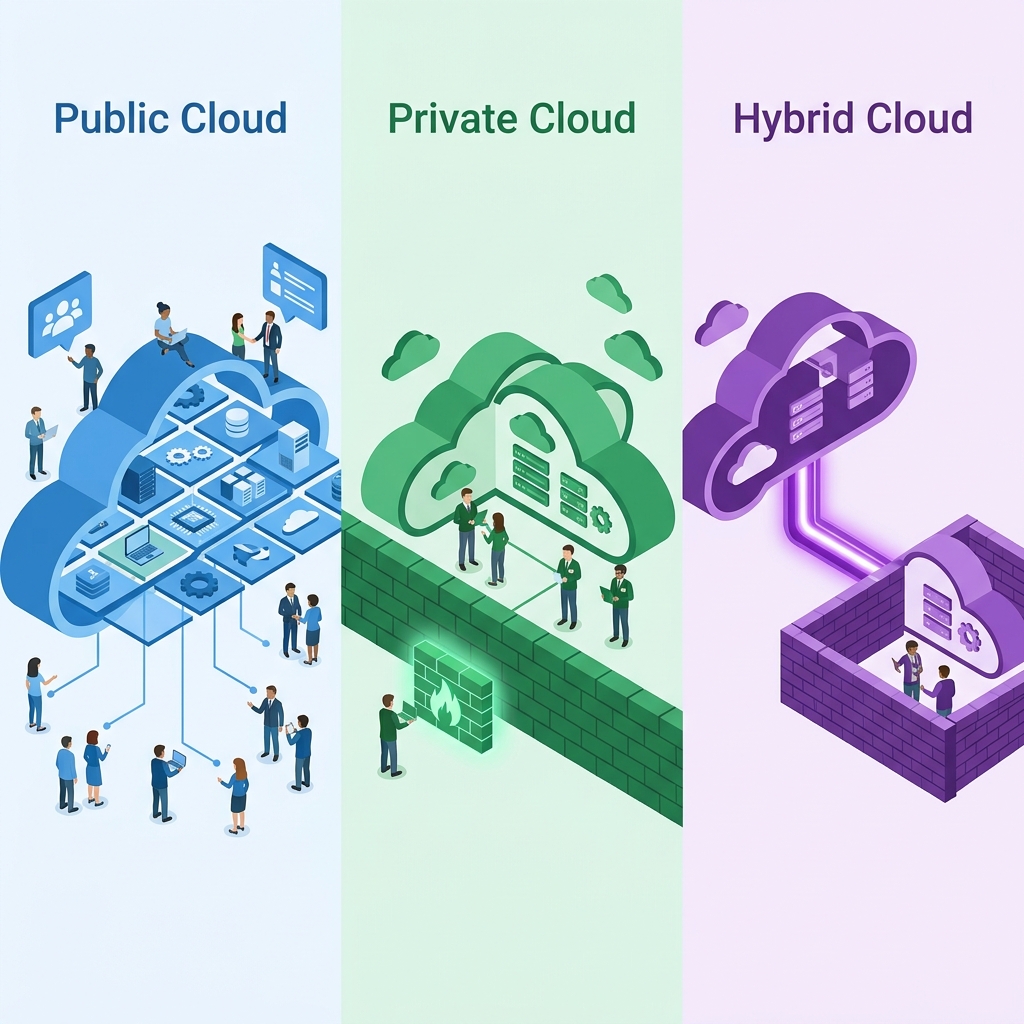
Cloud Computing mukhya roop se 3 prakaar ki hoti hai —
🔵 1. Public Cloud
Open AccessPublic Cloud aisi Cloud Service hai jisme Resources Internet ke maadhyam se sabhi Users ke liye uplabdh rehte hain। Iska upyog koi bhi vyakti ya Organization kar sakta hai।
🌐 Features
- Internet se sabhi ke liye accessible
- Shared resources ka use
- Pay-as-you-go pricing
🏢 Examples
- Google Cloud
- Microsoft Azure
- Amazon AWS
🟢 2. Private Cloud
Restricted AccessPrivate Cloud kisi ek Organization ya Company ke liye banaya jaata hai। Iska upyog kewal wahi Organization karti hai, jisse Data adhik surakshit rehta hai।
🔒 Features
- Sirf ek organization ke liye
- Dedicated resources
- High security & control
🏢 Examples
- Company Data Center
- Private Enterprise Cloud
🟣 3. Hybrid Cloud
CombinedHybrid Cloud, Public Cloud aur Private Cloud ka Combination hota hai। Isme aavashyak Data ko Private Cloud mein tatha anya Services ko Public Cloud mein rakha jaata hai, jisse Security aur Flexibility dono prapt hoti hain।
🔄 Kaise kaam karta hai
- Sensitive Data → Private Cloud mein
- General Services → Public Cloud mein
- Dono ke beech secure connection
- Best of both worlds — Security + Scalability
| Feature | 🔵 Public | 🟢 Private | 🟣 Hybrid |
|---|---|---|---|
| Access | Everyone | Single Org | Mixed |
| Cost | Low (Pay-as-use) | High (Dedicated) | Medium |
| Security | Standard | ✅ Very High | High |
| Flexibility | ✅ Very High | Limited | ✅ Very High |
| Control | Limited | ✅ Full | Partial |
🔴 Cloud Computing Services

IaaS
Infrastructure as a Service
Virtual Infrastructure milta hai — Server, Storage, Network
PaaS
Platform as a Service
Development Platform milta hai — Tools, Runtime, Database
SaaS
Software as a Service
Ready-to-use Software milta hai — Browser se access
Cloud Services Layer Model
🔴 1. IaaS (Infrastructure as a Service)
User apni aavashyakta ke anusaar Resources ko badha ya ghata sakta hai tatha kewal upyog kiye gaye Resources ka hi bhugtaan (Pay As You Use) karta hai।

🖥️ IaaS mein uplabdh Services:
Virtual Server
Storage
Networking
Virtual Machine
Firewall
Load Balancer
IP Address
Backup Facility
✨ Features of IaaS:
✅ Advantages
- Praarambhik lagat (Initial Cost) kam hoti hai
- Scalability adhik hoti hai
- Maintenance ki aavashyakta nahi hoti
- Data Backup aasaan hota hai
- Business Continuity bani rehti hai
❌ Disadvantages
- Internet par nirbharta rehti hai
- Security Provider par nirbhar karti hai
- Galat Configuration hone par Data Leak ka khatra
🏢 IaaS Examples:
Amazon EC2
Azure VM
Google Compute
IBM Cloud
Oracle Cloud
🔴 2. PaaS (Platform as a Service)
Is Service mein Server, Operating System, Database, Runtime Environment tatha Development Tools pehle se uplabdh rehte hain। Isliye Developer ko Infrastructure Manage karne ki aavashyakta nahi hoti aur woh kewal Application Development par dhyaan deta hai।
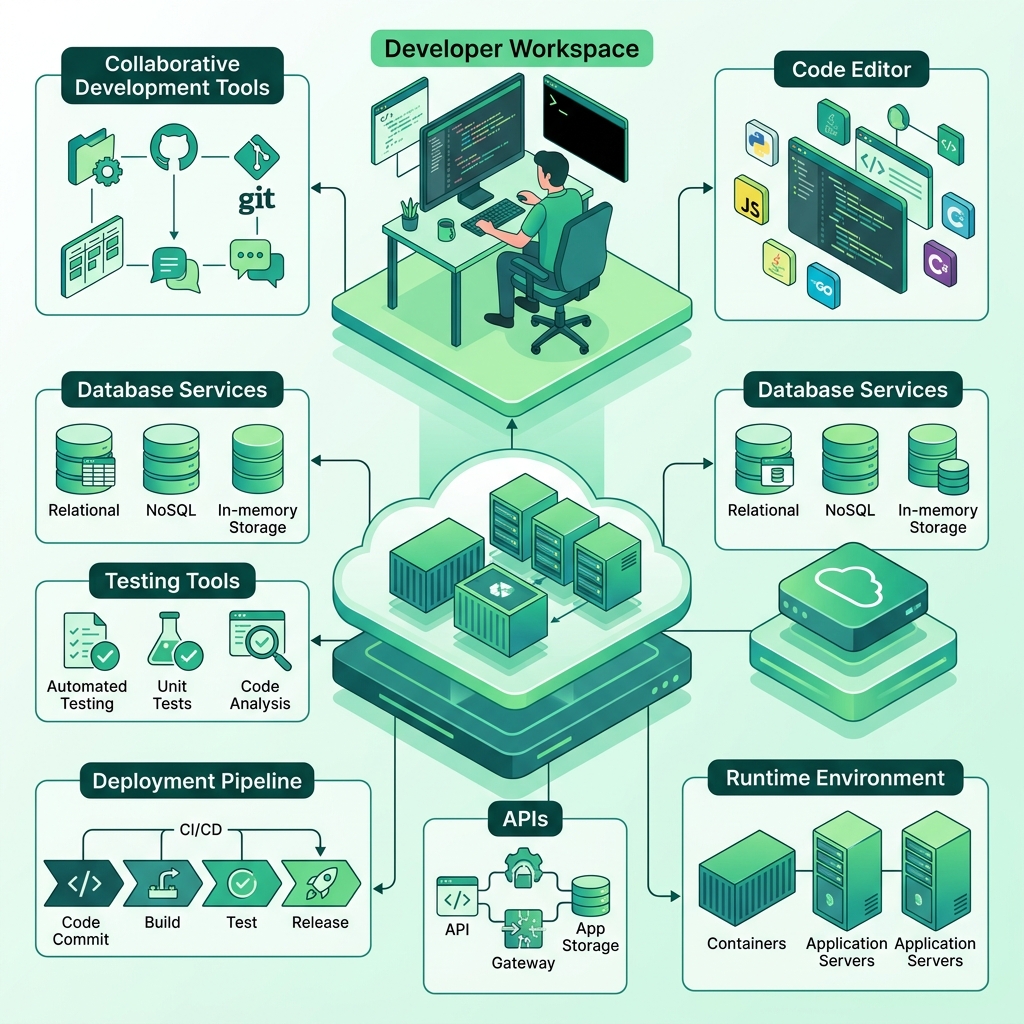
🛠️ PaaS mein uplabdh Services:
Dev Environment
Language Support
Database Mgmt
Runtime Env
Testing Tools
Deployment
Middleware
APIs
✨ Features of PaaS:
✅ Advantages
- Development Time kam ho jaata hai
- Cost kam hoti hai
- Productivity badhti hai
- Software jaldi Deploy kiya ja sakta hai
- Infrastructure ki chinta nahi rehti
❌ Disadvantages
- Platform Provider par Dependency rehti hai
- Limited Customization milti hai
- Vendor Lock-in ki samasya ho sakti hai
- Security poori tarah Provider par nirbhar
🏢 PaaS Examples:
Google App Engine
Azure App Svc
Heroku
Red Hat OpenShift
AWS Beanstalk
🔴 3. SaaS (Software as a Service)
User ko Software Install karne ki aavashyakta nahi hoti। Woh kewal Web Browser ya Mobile App ki sahaayata se Software ka upyog kar sakta hai। Software ka Maintenance, Security, Update tatha Backup Cloud Provider dwara kiya jaata hai।

📱 SaaS mein uplabdh Services:
Online Office
E-mail Service
Video Conference
Online Storage
CRM Software
ERP Software
LMS
✨ Features of SaaS:
✅ Advantages
- Installation ki aavashyakta nahi hoti
- Kahin se bhi upyog kiya ja sakta hai
- Low Cost hoti hai
- Automatic Backup milta hai
- Automatic Update uplabdh hote hain
- Collaboration aasaan hota hai
❌ Disadvantages
- Internet ke bina kaary nahi karta
- Data Security Provider par nirbhar karti hai
- Limited Control milta hai
- Subscription samaapt hone par Service band ho sakti hai
🏢 SaaS Examples:
Google Docs
Gmail
Microsoft 365
Zoom
Dropbox
Salesforce
Canva
🔴 IaaS, PaaS aur SaaS mein Antar
| Aadhaar | 🏗️ IaaS | 🛠️ PaaS | 📱 SaaS |
|---|---|---|---|
| Full Form | Infrastructure as a Service | Platform as a Service | Software as a Service |
| Kya milta hai | Infrastructure | Development Platform | Ready-to-use Software |
| Kiske liye | System Admin, IT Engineer | Developer | End User |
| User kya manage karta hai | OS, Apps, Data | Kewal App & Data | Kuch bhi nahi |
| Provider kya manage karta hai | Hardware, Storage, Network | Infra + OS + Runtime | Poora Software & Infra |
| Mukhya upyog | Virtual Server banana | App Develop karna | Software ka use karna |
| Examples | AWS EC2, Azure VM | Google App Engine, Heroku | Gmail, Docs, MS 365 |
Aasaan tarike se yaad rakhein:
IaaS
Infrastructure milta hai
PaaS
Platform milta hai
SaaS
Ready Software milta hai
🧠 Machine Learning (ML) — Definition
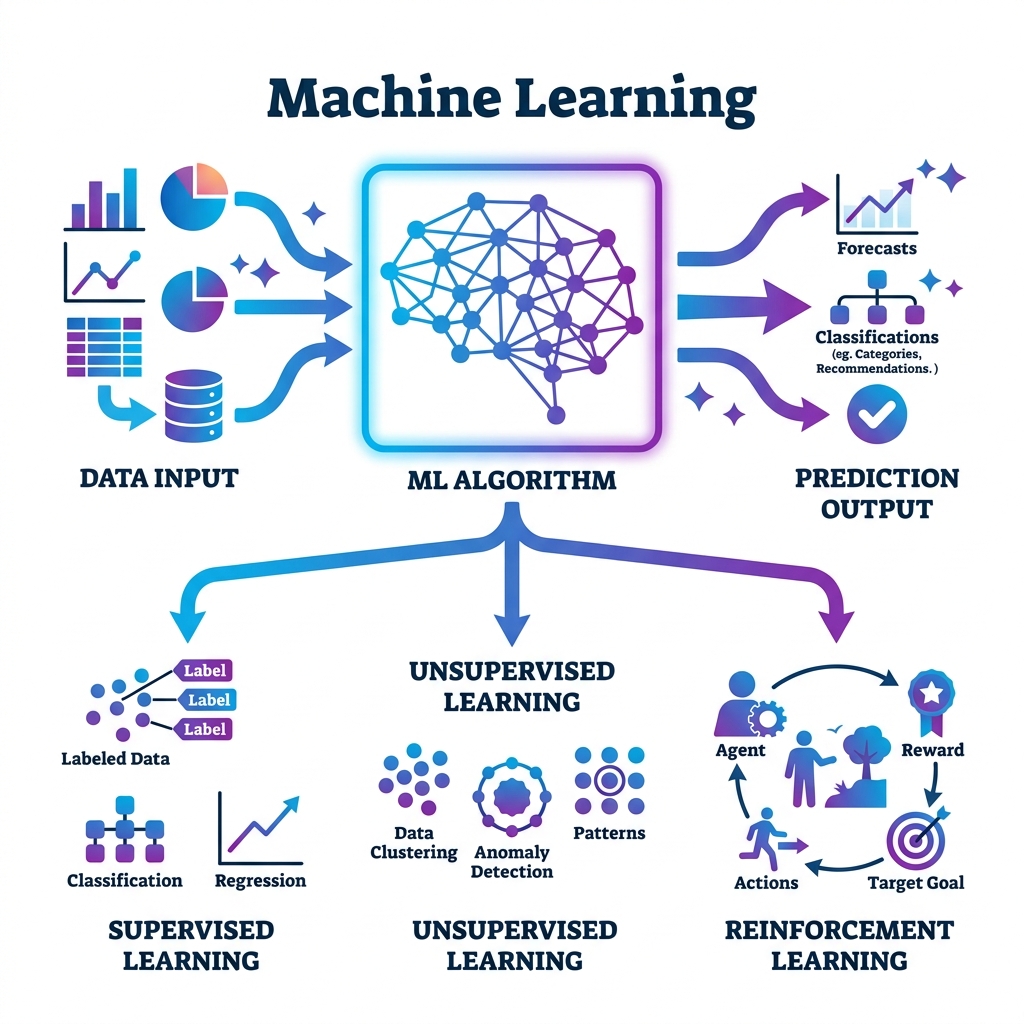
सामान्य Programming में प्रत्येक कार्य के लिए अलग-अलग Instructions लिखनी पड़ती हैं, जबकि Machine Learning में Computer को बड़ी मात्रा में Data उपलब्ध कराया जाता है। Computer उस Data का विश्लेषण (Analysis) करता है, उसमें समानताएँ (Patterns) खोजता है और भविष्य में आने वाले नए Data के आधार पर सही निर्णय लेने का प्रयास करता है।
इसी कारण Machine Learning को "Learning from Data" भी कहा जाता है।
Traditional Programming vs Machine Learning
Traditional Programming
Input + Rules → Output
Programmer rules likhta hai
Machine Learning
Input + Output → Rules (Model)
Machine khud rules seekhti hai
🧠 Working of Machine Learning
Machine Learning mukhya roop se nimn 5 charnon mein kaarya karti hai—
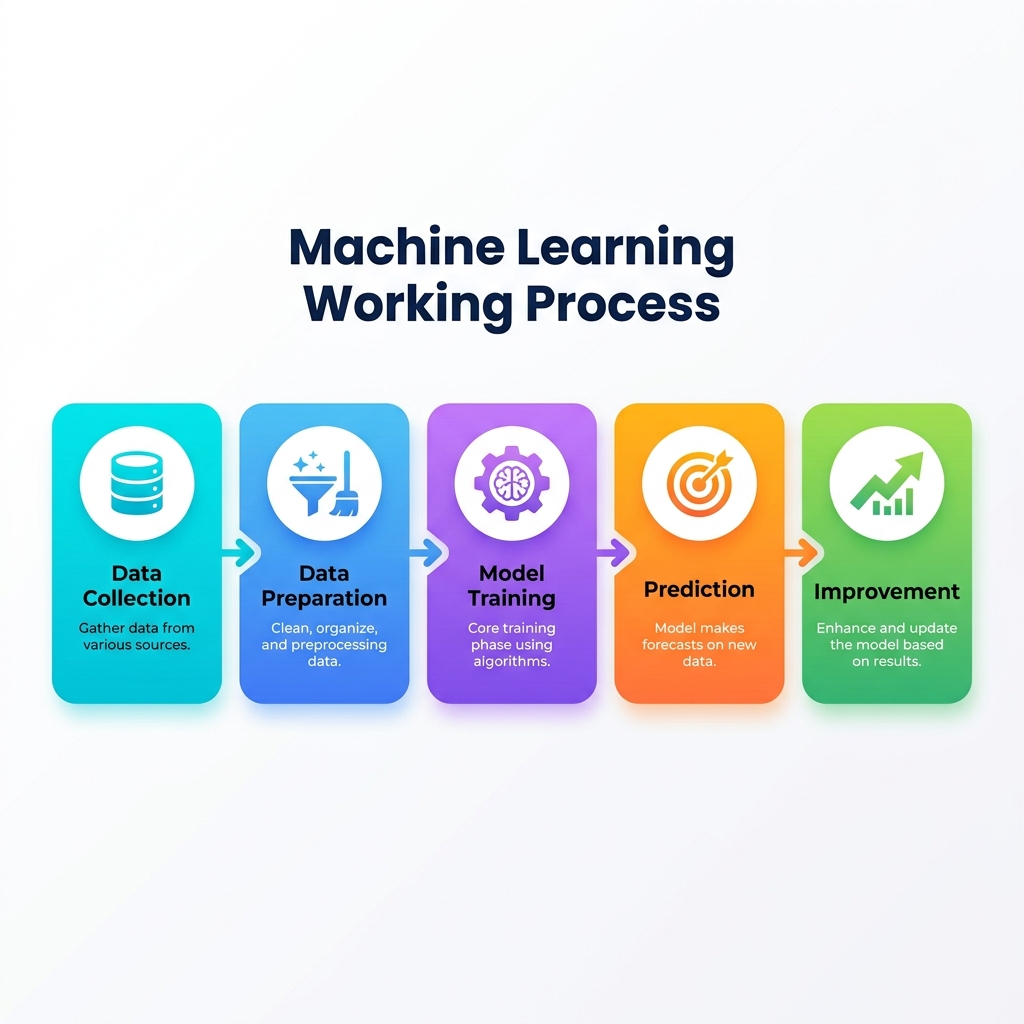
Step 1: Data Collection
Sabse pehle vibhinn Sources se Data ekatrit kiya jaata hai। Data jitna adhik aur Quality wala hoga, Model utna hi achha kaarya karega।
Step 2: Data Preparation
Collected Data ko saaf (Clean) kiya jaata hai। Isme Missing Values hataayi jaati hain, galat Data ko theek kiya jaata hai tatha Data ko Machine Learning ke liye tayyar kiya jaata hai।
Step 3: Model Training
Prepared Data ko Machine Learning Algorithm ko diya jaata hai। Algorithm Data ka adhyayan karta hai aur usmein maujood Patterns tatha Relationships ko seekhta hai।
Step 4: Prediction
Jab Model poori tarah seekh jaata hai, tab use naya Data diya jaata hai aur woh uske aadhaar par Prediction ya Decision deta hai।
Step 5: Improvement
Jaise-jaise naya Data milta hai, Machine Learning Model apni Accuracy ko lagaataar behtar banaata rahta hai।
🔄 ML Working Flow:
🧠 Types of Machine Learning
Machine Learning mukhya roop se teen prakaar ki hoti hai—
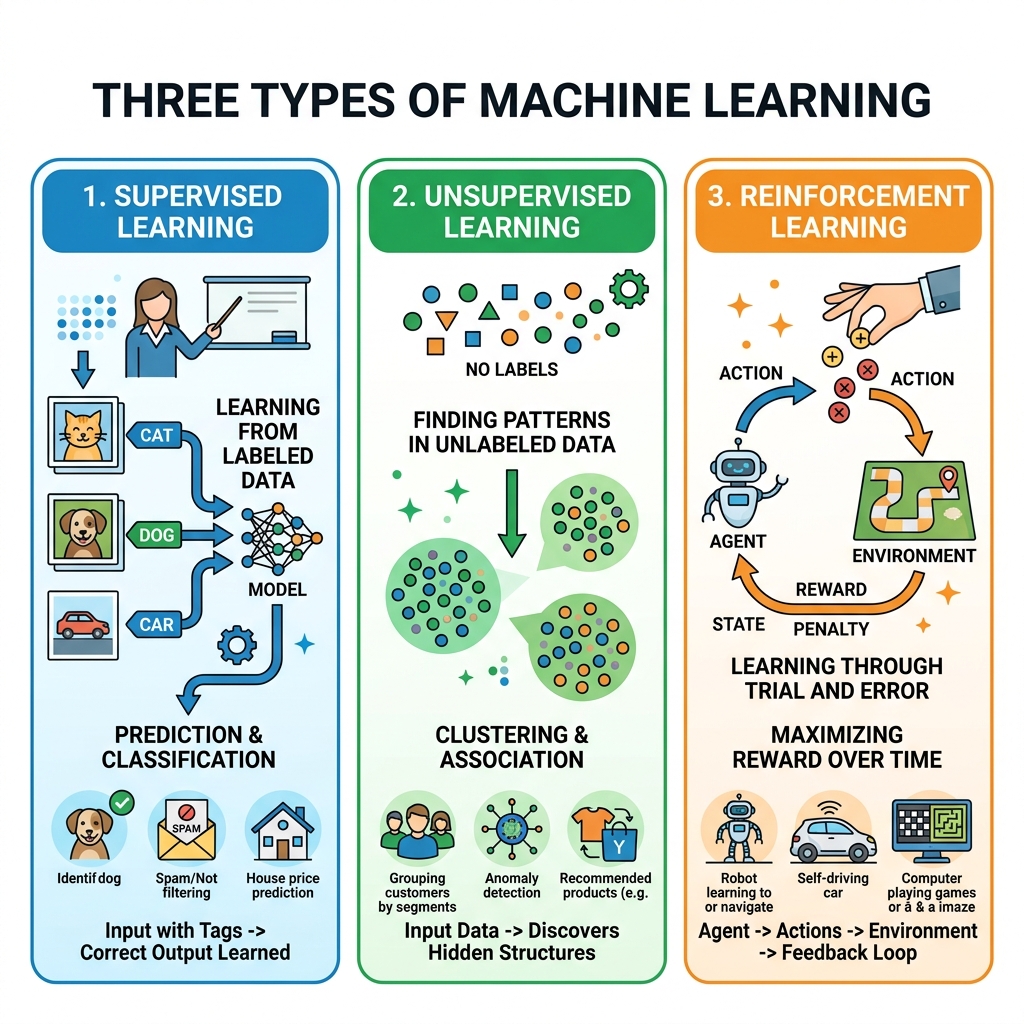
1. Supervised Learning
Label Data se seekhna
Is prakaar ki Learning mein Computer ko pehle se Label kiya hua Data diya jaata hai। Arthaat pratyek Data ke saath uska sahi uttar bhi uplabdh hota hai। Machine usi Data se seekhkar bhavishya mein naye Data ki sahi Prediction karti hai।
2. Unsupervised Learning
Bina Label Data se seekhna
Is Learning mein Computer ko bina Label wala Data diya jaata hai। Machine swayam Data ka adhyayan karti hai aur usmein samaanata (Similarity), Pattern tatha Group khojti hai।
3. Reinforcement Learning
Trial and Error se seekhna
Is prakaar ki Learning mein Machine Trial and Error Method se seekhti hai। Jab Machine sahi kaarya karti hai to use Reward milta hai aur galat kaarya karne par Penalty milti hai। Isi prakriya se woh samay ke saath behtar nirnay lena seekh jaati hai।
| Aadhaar | 📘 Supervised | 📗 Unsupervised | 📙 Reinforcement |
|---|---|---|---|
| Data Type | Labeled Data | Unlabeled Data | No Data — Reward/Penalty |
| Seekhne ka Tareeka | Teacher se (Guided) | Khud se (Self) | Trial & Error |
| Output | Prediction | Grouping / Pattern | Best Strategy |
| Example | Spam Detection | Customer Grouping | Self Driving Cars |
🧠 Advantages of Machine Learning
Computer स्वयं Data से सीख सकता है।
बड़ी मात्रा में Data का तेजी से विश्लेषण कर सकता है।
Prediction की Accuracy बढ़ जाती है।
Human Effort कम हो जाता है।
Decision Making तेज और अधिक सटीक होती है।
Automation को बढ़ावा मिलता है।
समय और लागत दोनों की बचत होती है।
🧠 Disadvantages of Machine Learning
अच्छे परिणाम के लिए बहुत अधिक Data की आवश्यकता होती है।
Model Training में अधिक समय लग सकता है।
Powerful Hardware की आवश्यकता होती है।
गलत Data मिलने पर गलत Prediction हो सकती है।
Model को समय-समय पर Update करना पड़ता है।
Development और Maintenance की Cost अधिक हो सकती है।
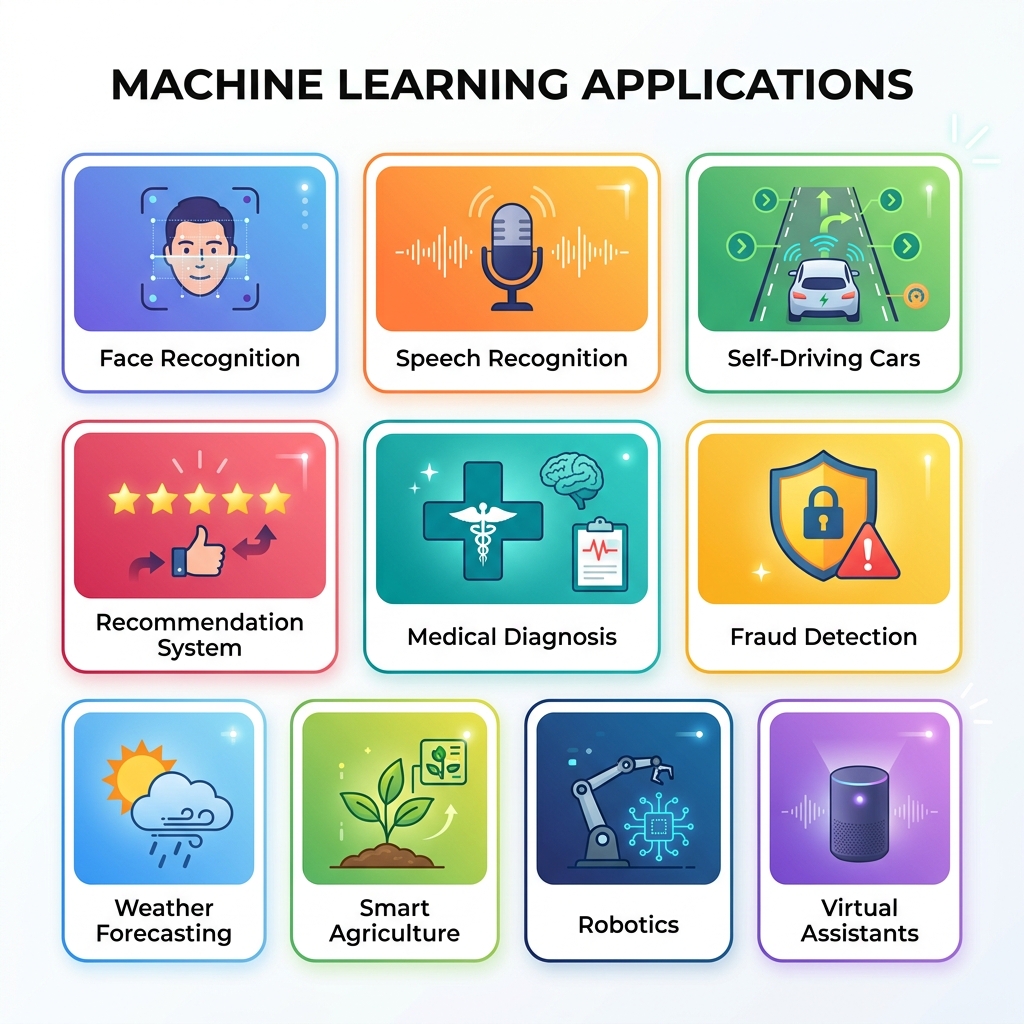
🧠 Applications of Machine Learning
Machine Learning ka upyog vartaman samay mein lagbhag har kshetra mein kiya ja raha hai—
🧠 Real Life Examples of ML
YouTube
Aapki pasand ke anusaar Videos Suggest karta hai।
Amazon
Aapke pichhle Shopping Data ke aadhaar par Products Recommend karta hai।
Google Maps
Traffic ka vishleshan karke sabse tez Route bataata hai।
Gmail
Spam E-mails ko Automatically pehchaankar Spam Folder mein bhej deta hai।
Netflix
Aapki Watch History ke aadhaar par Movies aur Web Series Suggest karta hai।
Machine Learning — Summary
Machine Learning ek aisi Technology hai jismein Computer Data se seekhta hai, Patterns ko pehchaanta hai aur bhavishya ke liye Prediction ya Decision leta hai। Yeh Artificial Intelligence ka ek mahatvapoorn bhaag hai aur vartaman samay mein Healthcare, Banking, Education, E-commerce, Robotics, Agriculture tatha Smart IoT Systems sahit lagbhag sabhi kshetron mein iska vyaapak upyog kiya ja raha hai।
📋 Chapter Summary
Is chapter mein humne IoT Security ki zaroorat, Cyber Attacks, Hackers, Malware, Phishing, DDoS, Brute Force Attack, Cyber Attack se bachne ke tarike, Cloud Computing (Public, Private, Hybrid), Cloud Services — IaaS, PaaS, SaaS aur Machine Learning (ML) — iske Types (Supervised, Unsupervised, Reinforcement), Working, Advantages, Disadvantages, Applications aur Real Life Examples ke baare mein seekha।