Introduction to IoT
Applications, Devices, Protocols aur Communication Model — IoT ki duniya mein aapka swagat hai!
🔹 Introduction — IoT
IoT ek network ke through data ko share aur exchange karta hai. Isme electronic components, internet connectivity, software aur hardware sab include hote hain.
📌 IoT ka Matlab
"Internet of Things" — yahan "Things" ka matlab kisi bhi object se hai jise internet ke through access kiya ja sakta hai.
IoT ki help se bahut saari smart cheezein possible hui hain:
Smart Refrigerator
Khud batata hai kya khatam ho raha hai
Smart Phone
Internet se connected personal device
Smart City
Traffic, waste, energy sab automated
🔹 History of IoT
🔹 Characteristics of IoT
IoT ki 4 important characteristics hain:
Connectivity
Intelligence
Sensing
Dynamic Nature
(1) Connectivity
IoT devices aur unke components jaise sensors, data devices, computer engine etc. ek dusre se connected rehte hain.
IoT devices kaise connect hote hain?
Radio Wave
Long range wireless
Bluetooth
Short range device pairing
WiFi
Internet connectivity
LiFi
Light-based communication
(2) Intelligence
IoT mein Big Data Analytics kiya jaata hai aur Machine Learning ka use hota hai jisse user better decision le sakta hai.
🎯 Intelligence kaise kaam karta hai?
- • Data Collection — Sensors se data collect hota hai
- • Data Analysis — Algorithms data ko analyze karte hain
- • Smart Decisions — System automatically best decision leta hai
- • Business Discussion — Situation ke according data ka use karke business decisions bhi liye ja sakte hain
(3) Sensing
Sensors environment ki conditions ko detect aur measure karte hain. Inke through hum apni surroundings ko easily samajh sakte hain aur unka analysis kar sakte hain.
👉 Sensors ke Examples:
Electronic
Electronic signals detect karta hai
Chemical
Chemical composition measure karta hai
Gyroscope
Rotation aur orientation track karta hai
Pressure
Air/liquid pressure measure karta hai
Light Sensor
Light intensity detect karta hai
GPS
Global Positioning System — location track karta hai
⚙️ Sensors kaise kaam karte hain?
(4) Dynamic Nature
IoT mein data ko real-time mein collect aur convert kiya jaata hai jisse business discussion aur analysis kiya ja sake. IoT ke components ka nature bhi dynamic hona chahiye.
👉 Example — Temperature Sensor
Agar IoT sensor temperature detect karta hai, to har location aur weather condition ke hisab se temperature change hota rahega:
Mumbai
Temperature: 32°C — Humid & Hot
Delhi
Temperature: 18°C — Cool & Dry
(5) Scale
IoT ka ek important feature ye hai ki iska scale flexible hota hai — chhote se lekar bahut bade systems tak kaam kar sakta hai.
Small Scale IoT
Kisi ek room ya home ke liye — jaise Smart Home system jisme sirf ghar ke devices connected hain
Large Scale IoT
Poori factory ya company level par — jaise Industrial IoT jisme hazaron machines connected hain
🔴 (6) Security
Agar IoT system mein proper security na ho, to data aur information ko khatara ho sakta hai.
⚠️ Agar security na ho to kya ho sakta hai?
Data Hack
Koi bhi aapka data chura sakta hai
Data Manipulate
Data ko galat tarike se change kiya ja sakta hai
🛡️ IoT Security ke liye kya karna chahiye?
Firewall Install karna
Unauthorized access se bachata hai
VPN ka use karna
Data encrypted tunnel se bhejta hai
🔴 Communication
IoT system mein communication ke liye alag-alag wireless aur wired technologies ka use hota hai.
📶 Communication ke liye technologies:
WiFi
High-speed internet connectivity — ghar aur office mein use hoti hai
LPWA
Low Power Wide Area — long range, low power devices ke liye
🔴 How IoT Works
IoT system mein alag-alag smart devices use hote hain jo ek platform ke through aapas mein communicate karte hain.
📱 IoT mein use hone wale devices:
Smart Phone
Smart Watch
Smart TV
Washing Machine
🎯 IoT system ka main kaam:
🔴 Four Fundamental Concepts of IoT System
Sensors / Devices
Connectivity
Data Processing
User Interface
📡 (1) Sensors or Devices
Sensors ya devices environment se live data collect karte hain.
👉 Data simple bhi ho sakta hai — jaise temperature
👉 Data complex bhi ho sakta hai — jaise video feed
👉 Devices alag-alag type ke sensors use karte hain
📌 Example — Mobile Phone:
Ye sab sensing ka kaam karte hain!
🔗 (2) Connectivity
Collected data ko cloud ya system tak bhejne ke liye connectivity use hoti hai.
👉 Data communication ke liye networks use hote hain
👉 Sensors se data collect karke network ke through cloud mein bheja jata hai
⚙️ (3) Data Processing
Jo data collect hota hai usko process kiya jata hai.
👉 Processing ke baad meaningful aur useful information milti hai
📱 (4) User Interface
User interface wo medium hai jiske through user information dekhta hai.
📌 Example — Temperature Control:
🌡️ Room ka temperature bahut zyada ho jata hai
🔔 IoT system user ko notification bhejta hai
📱 User mobile se temperature adjust kar sakta hai
🔹 IoT Applications
Wearable
Health
Traffic
Agriculture
Smart Home
Smart City
Industrial
Surveillance
⌚ (1) Wearable
Wearable devices wo hote hain jo hum body par pehnte hain.
👉 Sensors body ka data collect karte hain aur health/activity monitor karte hain
👉 Ye devices kam energy consume karte hain aur continuous data collect karte hain
🏥 (2) Health
IoT ka use health sector mein bahut important hai.
🛏️ Smart beds
Patients ki condition monitor karte hain
📊 Real-time Data
Temperature, BP, Pulse rate
👉 Doctor patient ko easily monitor kar sakta hai — real-time data milta hai
🚦 (3) Traffic Monitoring
IoT ka use traffic control mein bhi hota hai.
👉 Vehicles ki speed detect karta hai
👉 Traffic condition analyse karta hai
👉 Traffic rules follow karwana easy hota hai — Traffic jam control hota hai
👉 Computer system automatically data analyse karta hai
🌾 (4) Agriculture
IoT ka use farming mein bhi hota hai.
👉 Better crop production aur smart irrigation possible hoti hai
🏠 (5) Smart Home
IoT ka sabse common use smart home mein hota hai.
👉 User mobile se control kar sakta hai — jaise mobile se light ON/OFF karna
🏙️ (6) Smart City
IoT ka use smart city banane mein hota hai.
👉 City efficient aur automated ho jaati hai
🏭 (7) Industrial Automation
IoT industries mein production improve karta hai.
👉 Machines automatically kaam karti hain
👉 Human effort kam hota hai — Production fast hota hai
👉 Automation bina human interaction ke possible hai
📹 (8) Surveillance
IoT ka use security aur monitoring mein hota hai.
👉 CCTV cameras mein sensors lage hote hain — system activity detect karta hai aur owner ko alert/message bhejta hai
🔴 Building Blocks of IoT
Sensors
Processor
Gateway
Application
📡 (1) Sensors
Sensors IoT device ka front-end hote hain — ye environment se data receive karte hain.
⚙️ (2) Processor
Processor ek electrical system hota hai — sensors se aane wale raw data ko process karta hai.
• Data ko information mein convert karna
• Data ko control karna
• Encryption / Decryption karna
🌐 (3) Gateway
Gateway data transfer ka main medium hota hai — data ko network mein bhejta hai aur communication establish karta hai.
📱 (4) Application
Application user side hoti hai — data collect karti hai aur user ko information provide karti hai.
🔹 IoT Ecosystem
IoT ecosystem mein multiple elements hote hain jo ek dusre ke saath interact karte hain aur data ko collect, process aur use karte hain.
🔸 Main Components of IoT Ecosystem
Devices / Sensors
Connectivity
Data Processing
User Interface
📡 (1) Devices / Sensors
Ye ecosystem ka starting point hote hain — sensors environment se data collect karte hain.
👉 Ye real-world data ko digital form mein convert karte hain
🔗 (2) Connectivity
Devices se data ko aage bhejne ke liye connectivity use hoti hai.
⚙️ (3) Data Processing
Jo data sensors collect karte hain, use process kiya jata hai.
📱 (4) User Interface
User interface wo medium hai jahan user data dekhta hai.
👉 User data dekh sakta hai aur device ko control kar sakta hai
🔄 Working of IoT Ecosystem
👉 Ye pura system automatically kaam karta hai
🔴 Types of Network
PAN
Personal Area Network
~10mLAN
Local Area Network
Small AreaMAN
Metropolitan Network
City LevelWAN
Wide Area Network
Global📱 (1) PAN — Personal Area Network
PAN ek small range network hota hai — personal devices ke liye use hota hai.
🏫 (2) LAN — Local Area Network
LAN ek limited area network hota hai — school, office ya building mein use hota hai.
🏙️ (3) MAN — Metropolitan Area Network
MAN ek city level network hota hai — city mein communication ke liye use hota hai.
🌍 (4) WAN — Wide Area Network
WAN sabse bada network hota hai — large area cover karta hai aur countries/continents tak connect kar sakta hai.
🌐 Internet🔹 Various Technologies & Protocols
| Technology | Range | Standard | Use Case |
|---|---|---|---|
| 🔵 Bluetooth | ~10m | IEEE 802.15.1 | Headphones, Watch |
| ⚡ BLE | Short | BT 4.0+ | Fitness Band, IoT |
| 📶 WiFi | 50-100m | IEEE 802.11 | Home, Office |
| 💡 LiFi | Room | IEEE 802.15.7 | High-speed Indoor |
| 📡 Cellular | Wide | GSM/LTE/5G | Mobile, Remote IoT |
| 🏠 Z-Wave | 30m | Z-Wave Alliance | Smart Home |
| 🏷️ RFID | cm–100m | ISO 18000 | Tracking, ID Cards |
| 📲 NFC | ~4cm | ISO 14443 | Payments, Cards |
| 🕸️ Zigbee | 10-100m | IEEE 802.15.4 | Sensor Network |
| 🌐 6LoWPAN | Short | IETF IPv6 | IoT + Internet |
| 📞 GSM | Wide | GSM (2G) | Calls, SMS |
| 📦 GPRS | Wide | 2.5G | Basic Internet |
| 🚀 LTE | Wide | 4G (3GPP) | High-speed Data |
📶 Short Range Technologies
Bluetooth
IEEE 802.15.1BLE (Bluetooth Low Energy)
Bluetooth 4.0+WiFi
IEEE 802.11LiFi (Light Fidelity)
IEEE 802.15.7🏠 Home Automation & Identification
Z-Wave
Z-Wave AllianceZigbee
IEEE 802.15.4RFID
ISO/IEC 18000NFC
ISO/IEC 14443🏷️ RFID Tag Types
🟢 Active RFID Tag
Battery hoti hai — long range, strong signal, continuous transmission
🔵 Passive RFID Tag
Battery nahi — reader ki energy se kaam karta hai, short range, low cost
📡 Wide Area & Cellular Technologies
Cellular Network
GSM / LTE / 5G NR6LoWPAN
IETF IPv6GSM
GSM (2G)GPRS
2.5G (GSM ext.)LTE (4G)
4G LTE (3GPP)🔹 OSI Model in IoT — Layer-wise Protocols
OSI model mein 7 layers hoti hain — har layer ka apna specific kaam hota hai. IoT mein har layer par different protocols use hote hain jo data ko ek device se dusri device tak pahunchate hain.
📊 OSI Model — IoT Protocol Stack
Application Layer
User ke saath direct interaction
Presentation Layer
Data format, encryption & compression
Session Layer
Connection establish, maintain & terminate
Transport Layer
Data delivery & error handling
Network Layer
Routing & addressing
Data Link Layer
Node-to-node data transfer
Physical Layer
Physical medium — wires, signals
📌 Layer-wise Protocol Details
📱 Layer 7 — Application Layer
Ye layer user ke sabse close hoti hai — yahan protocols directly applications se interact karte hain.
HTTP
Web browsing ke liye
CoAP
Lightweight IoT protocol
MQTT
Publish-subscribe messaging
XMPP
Real-time messaging
🔄 Layer 6 — Presentation Layer
Data ko format, encrypt aur compress karta hai taaki dono sides samajh sakein.
GDS
Data structure format
Web Sockets
Full-duplex communication
AMQP
Advanced message queuing
🤝 Layer 5 — Session Layer
Ye layer connection ko establish, maintain aur terminate karta hai. IoT mein session management ke through devices ke beech communication sessions handle hote hain.
🚚 Layer 4 — Transport Layer
Data ko reliably deliver karta hai — error checking aur flow control karta hai.
TCP
Transmission Control Protocol — reliable, connection-oriented, data loss nahi hota
UDP
User Datagram Protocol — fast, connectionless, IoT sensors ke liye best
🗺️ Layer 3 — Network Layer
Data ko source se destination tak route karta hai — IP addressing use hoti hai.
IPv4
32-bit address
IPv6
128-bit address — IoT future
6LoWPAN
IPv6 over low-power networks
🔗 Layer 2 — Data Link Layer
Ye layer node-to-node data transfer karta hai aur error detection handle karta hai.
MAC Address
Har device ka unique physical address — device identify karne ke liye
⚡ Layer 1 — Physical Layer
Ye layer actual physical medium hai jiske through data bits transfer hote hain.
802.3
Ethernet (Wired)
802.16
WiMax (Long range)
802.11
WiFi (Wireless LAN)
Cellular
2G / 3G / LTE / 5G
📋 Quick Summary Table
| Layer | Name | Protocols / Standards | Kaam |
|---|---|---|---|
| 7 | Application | HTTP, CoAP, MQTT, XMPP | User interaction |
| 6 | Presentation | GDS, Web Sockets, AMQP | Data format & encryption |
| 5 | Session | Session Management | Connection manage |
| 4 | Transport | TCP, UDP | Data delivery |
| 3 | Network | IPv4, IPv6, 6LoWPAN | Routing & addressing |
| 2 | Data Link | MAC Address | Node-to-node transfer |
| 1 | Physical | 802.3, 802.16, 802.11, Cellular | Physical signals |
🔹 IoT Protocols — Detailed Explanation
🌐 HTTP
Hyper Text Transfer Protocol
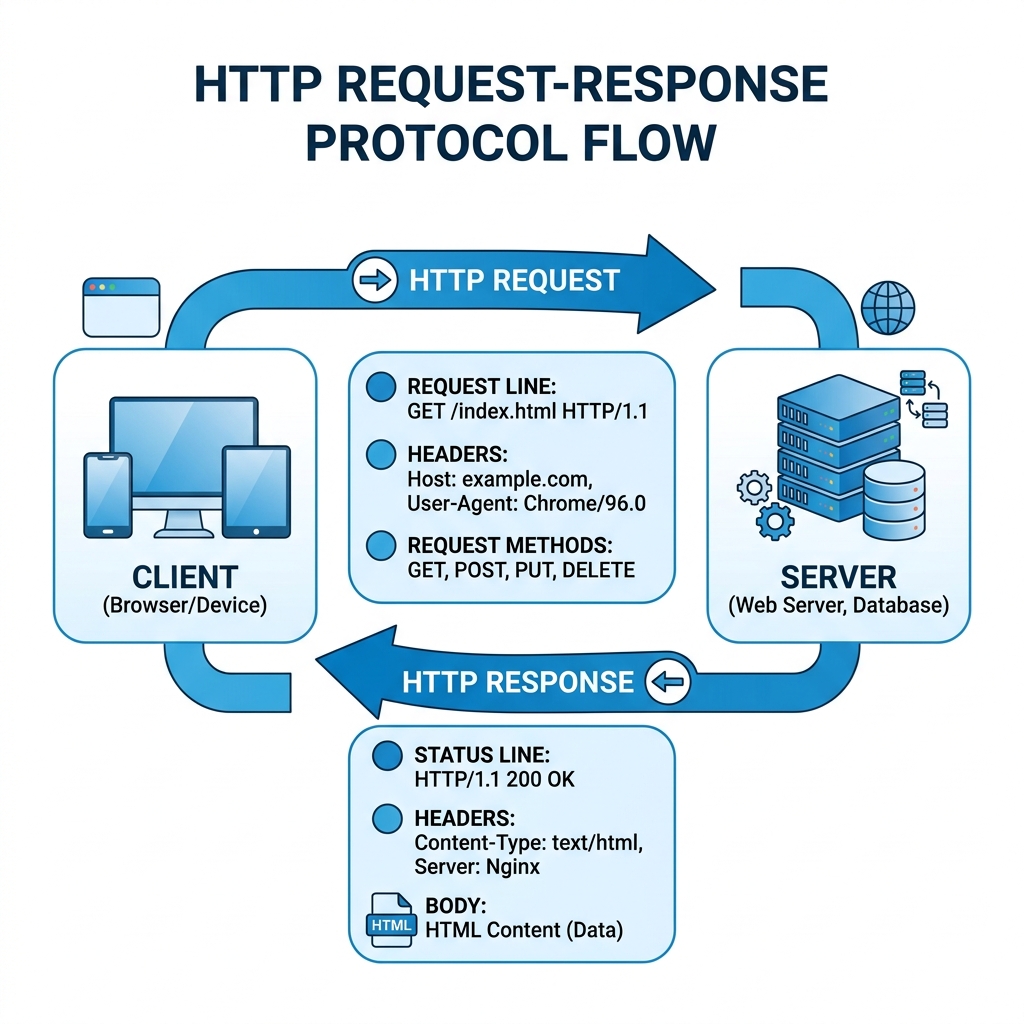
HTTP ek request-response protocol hai. Iska use internet mein browser ke dwara kisi host par communication karne ke liye kiya jata hai.
⚙️ Kaise kaam karta hai?
📡 CoAP
Constrained Application Protocol
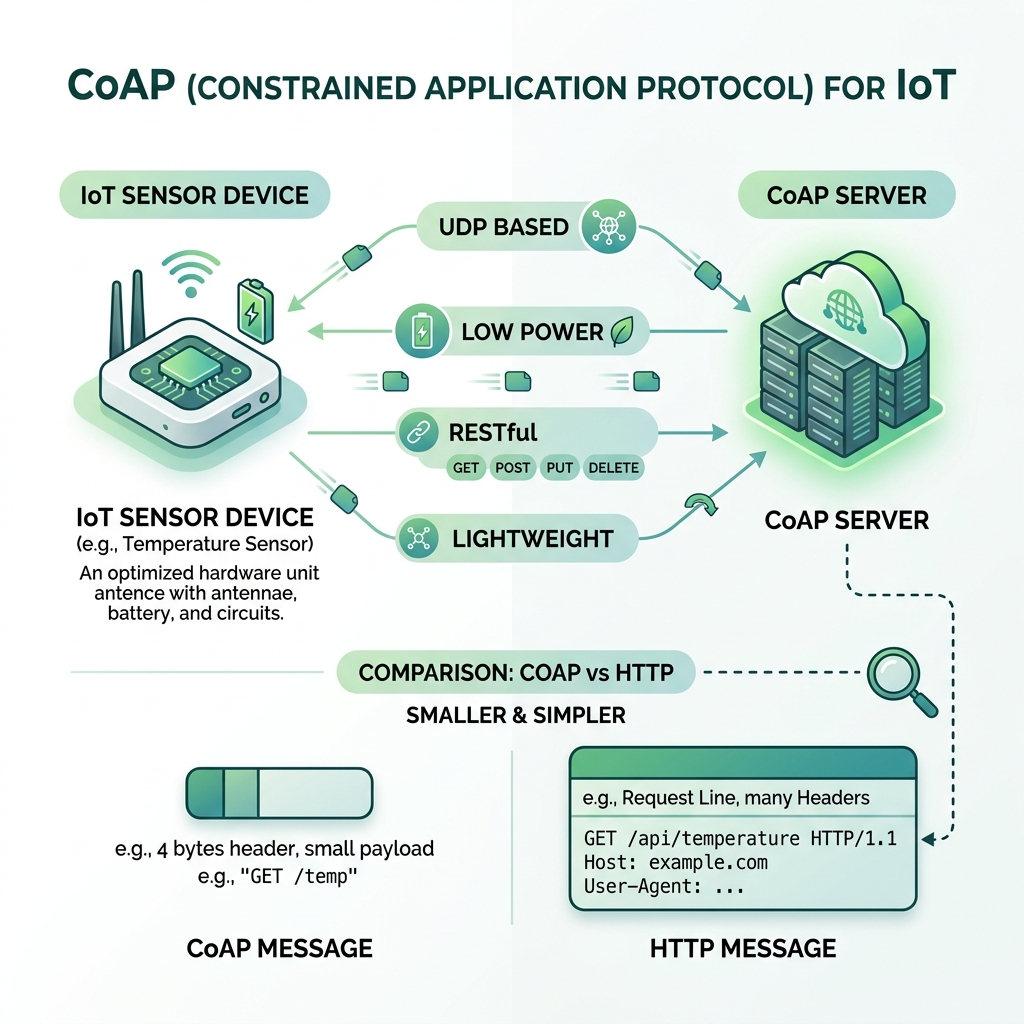
Ye protocol internet par communication karne ke liye use hota hai. Ye ek lightweight protocol hai jo low power devices ke liye useful hota hai.
🔄 HTTP vs CoAP
HTTP
Heavy · TCP · Web ke liye
CoAP ✅
Light · UDP · IoT ke liye
📨 MQTT
Message Queue Telemetry Transport
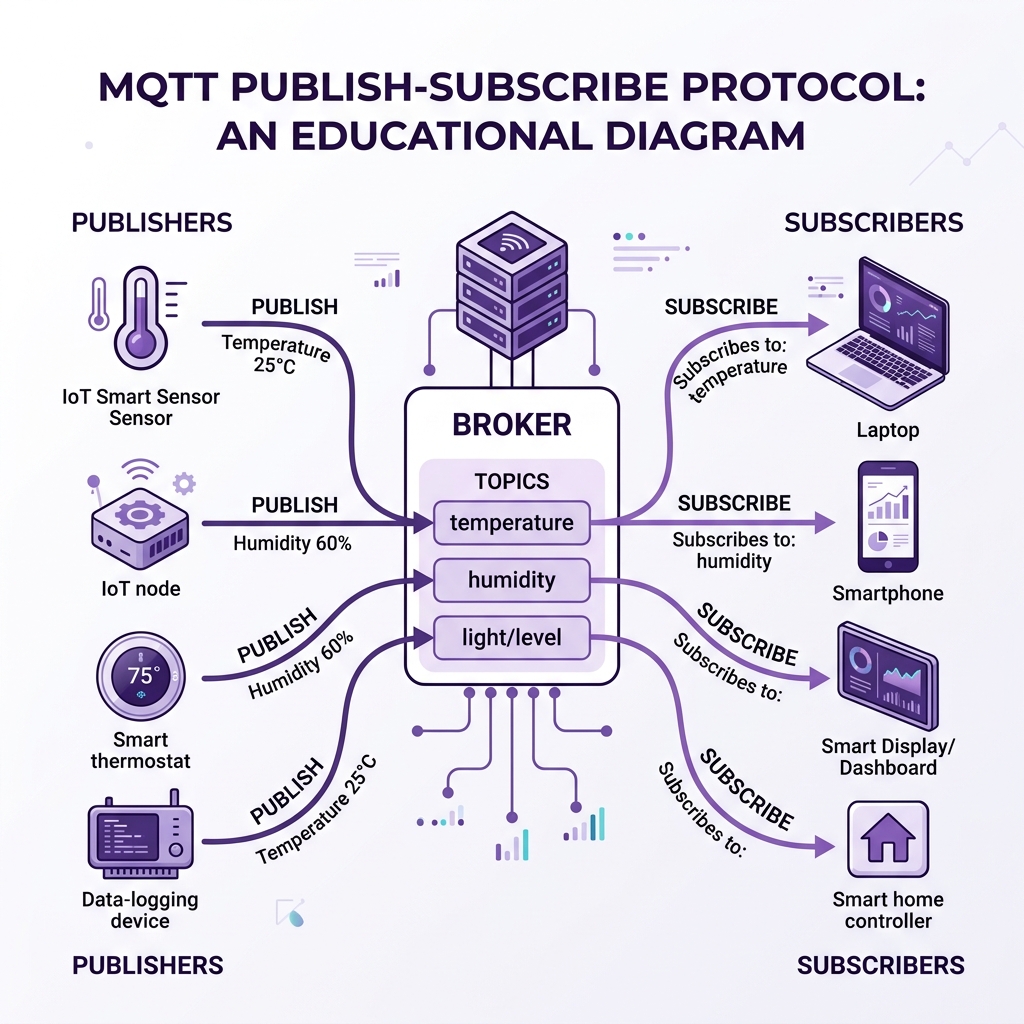
Ye machine to machine communication ke liye use hota hai. Ye ek publish-subscribe protocol hai jo TCP par kaam karta hai.
🔄 MQTT Working Flow
👉 Client publisher ya subscriber ho sakta hai
👉 Ek broker hota hai jo data ko manage karta hai
👉 Client TCP ke madhyam se broker se connected rehta hai
👉 Client publish aur subscribe dono kar sakta hai
💬 XMPP
Extensible Messaging and Presence Protocol
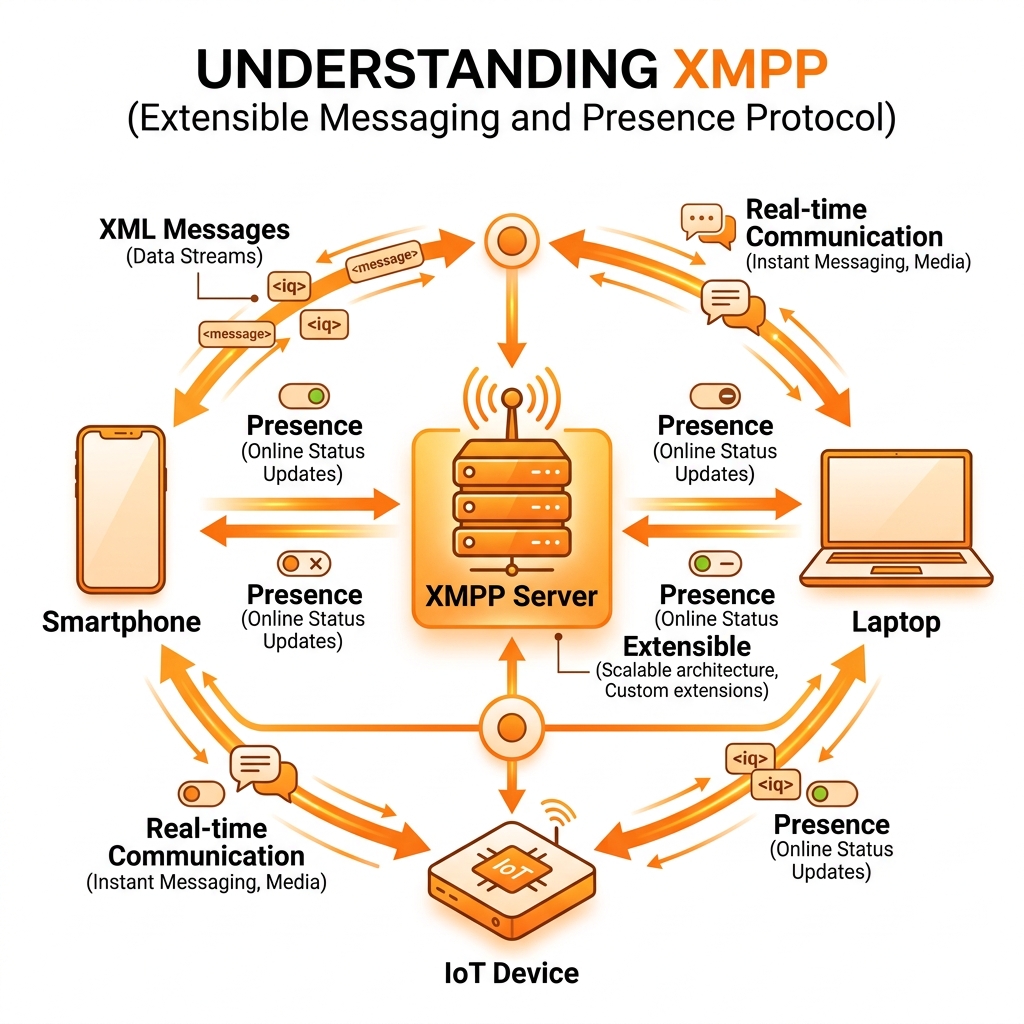
Ye protocol XML language par aadharit hota hai. Iska use communication ke liye kiya jata hai jisme message transfer kiya jata hai.
👉 Isse different devices ke beech extensible data share kiya ja sakta hai
👉 IoT network mein ye publish-subscribe system ke roop mein bhi use hota hai
👉 Real-time messaging aur presence detection support karta hai
⚡ DDS
Data Distribution Service
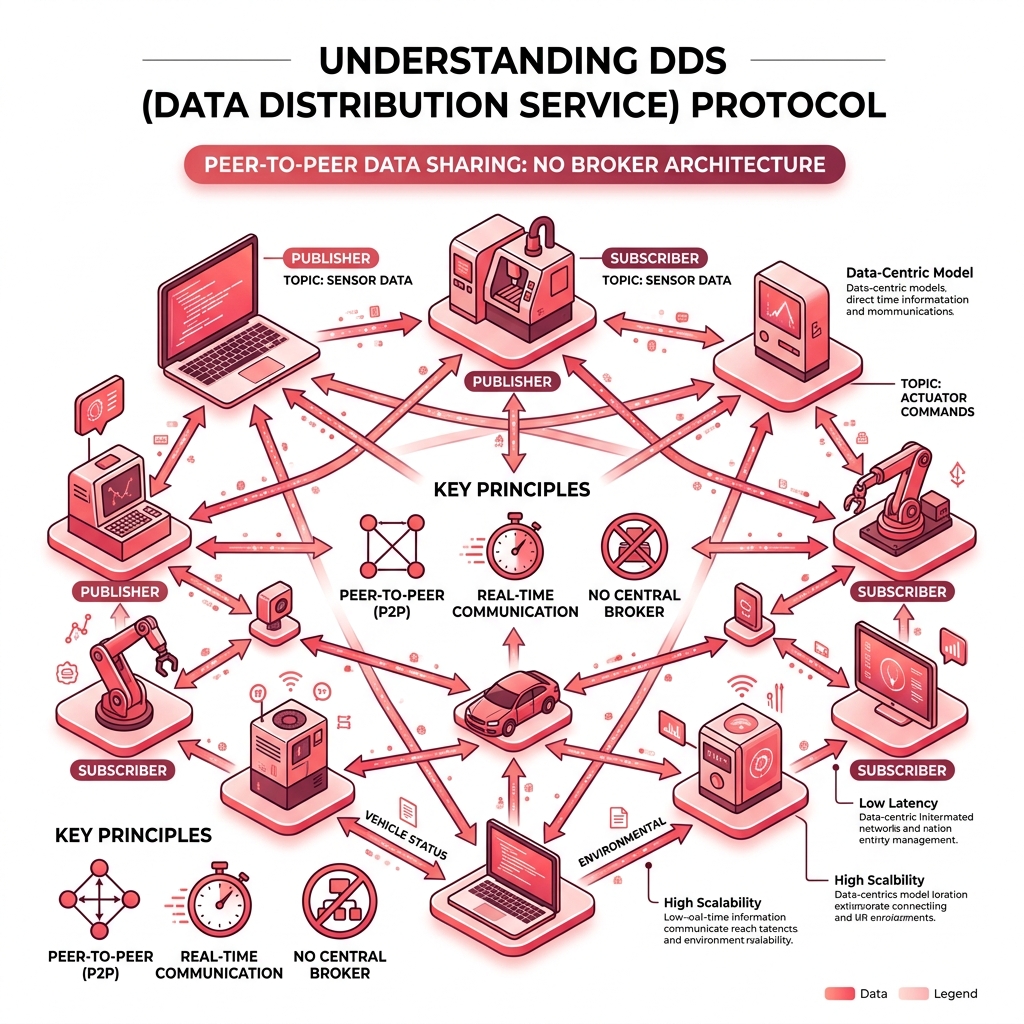
Ye protocol OS aur software ke beech data transfer karne ke liye use hota hai. Iska use real-time communication ke liye kiya jata hai.
🔄 DDS vs MQTT
MQTT
Broker zaruri · Centralized
DDS ✅
No Broker · Peer-to-Peer
📦 AMQP
Advanced Message Queuing Protocol
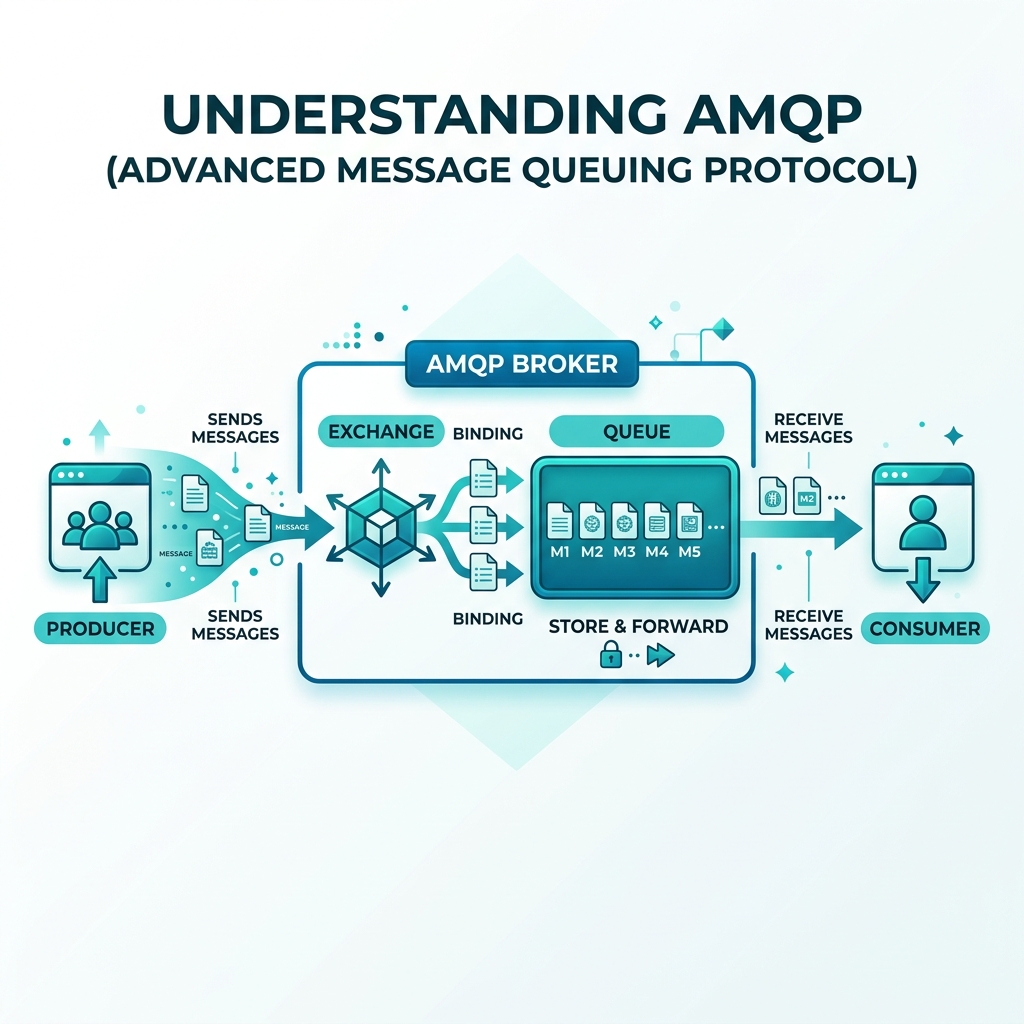
Iska use devices ko jodne ke liye kiya jata hai. Ye protocol devices ke beech data transfer ke saath-saath data ko store bhi karta hai.
⚙️ AMQP Working
📋 All Protocols — Quick Comparison
| Protocol | Full Form | Type | Use Case |
|---|---|---|---|
| 🌐 HTTP | Hyper Text Transfer Protocol | Request-Response | Web browsing |
| 📡 CoAP | Constrained Application Protocol | Request-Response (UDP) | Low power IoT |
| 📨 MQTT | Message Queue Telemetry Transport | Publish-Subscribe | Sensor data, M2M |
| 💬 XMPP | Extensible Messaging & Presence | XML Messaging | Real-time chat, IoT |
| ⚡ DDS | Data Distribution Service | Peer-to-Peer | Real-time systems |
| 📦 AMQP | Advanced Message Queuing | Message Queue | Device connectivity |
🔹 Network Layer
🎯 Network Layer ke main functions
👉 Addressing: Har device ko ek unique IP address diya jata hai
👉 Routing: Data kis path se jayega (shortest / fastest route) ye decide karta hai
👉 Packet forwarding: Data packets ko next device tak forward karta hai
📌 Use hone wale protocols
🔴 IPv4 (Internet Protocol Version 4)
IPv4 ek addressing system hai jo devices ko internet par identify karne ke liye use hota hai.
⚙️ Isme kya hota hai?
- • 32-bit address hota hai
- • Address ko 4 parts me divide kiya jata hai
- • Har part 8-bit ka hota hai (0–255 range)
📝 Format & Limitations
Example: 192.168.1.1
Limitation: Limited addresses (approx 4.3 billion) — IoT me devices bahut zyada hote hain isliye address shortage hoti hai.
🔄 Working samajh
Jab koi device internet par data bhejta hai, sender aur receiver dono ka IP address use hota hai. Data packet ke header me address attach hota hai aur network us address ke basis par data deliver karta hai.
🟣 IPv6 (Internet Protocol Version 6)
IPv6 IPv4 ka upgraded version hai jo address shortage problem ko solve karta hai.
⚙️ Isme kya hota hai?
- • 128-bit address hota hai
- • Bahut huge number of addresses available hote hain
📝 Format
Example:
2001:0db8:85a3:0000:0000:8a2e:0370:7334
🌟 Features & Importance in IoT
IoT me millions of devices hote hain → har device ko unique address chahiye. Isliye IPv6 use hota hai.
🔹 Physical Layer
⚙️ Is layer ka kaam
👉 Data ko electrical signals / radio signals me convert karna
👉 Physical medium (wire ya wireless) ke through data bhejna
🔌 IEEE 802.3 Ethernet (Very Important)
IEEE 802.3 Ethernet ek wired communication technology hai jo LAN (Local Area Network) me use hoti hai.
✅ Ethernet kya karta hai?
- • Devices ko cable ke through connect karta hai
- • Data ko fast aur reliable tarike se transfer karta hai
🌟 Features of Ethernet
- • High speed data transfer
- • Reliable communication
- • Stable connection (wire hone ki wajah se)
🔄 Working samajh
Devices LAN cable se connect hote hain. Data frames ke form me bheja jata hai aur MAC address ke through identify hota hai.
📍 Use kaha hota hai?
🔹 IoT Communication Models
Request-Response
Publish-Subscribe
Push-Pull
Exclusive Pair
🔄 (1) Request-Response Model
Ye ek basic communication model hai jo client-server architecture par based hota hai.
⚙️ Working
- • Client request bhejta hai
- • Server request ko process karta hai
- • Server response client ko bhejta hai
📌 Important
- • Communication request ke bina start nahi hota
- • HTTP protocol me yahi use hota hai
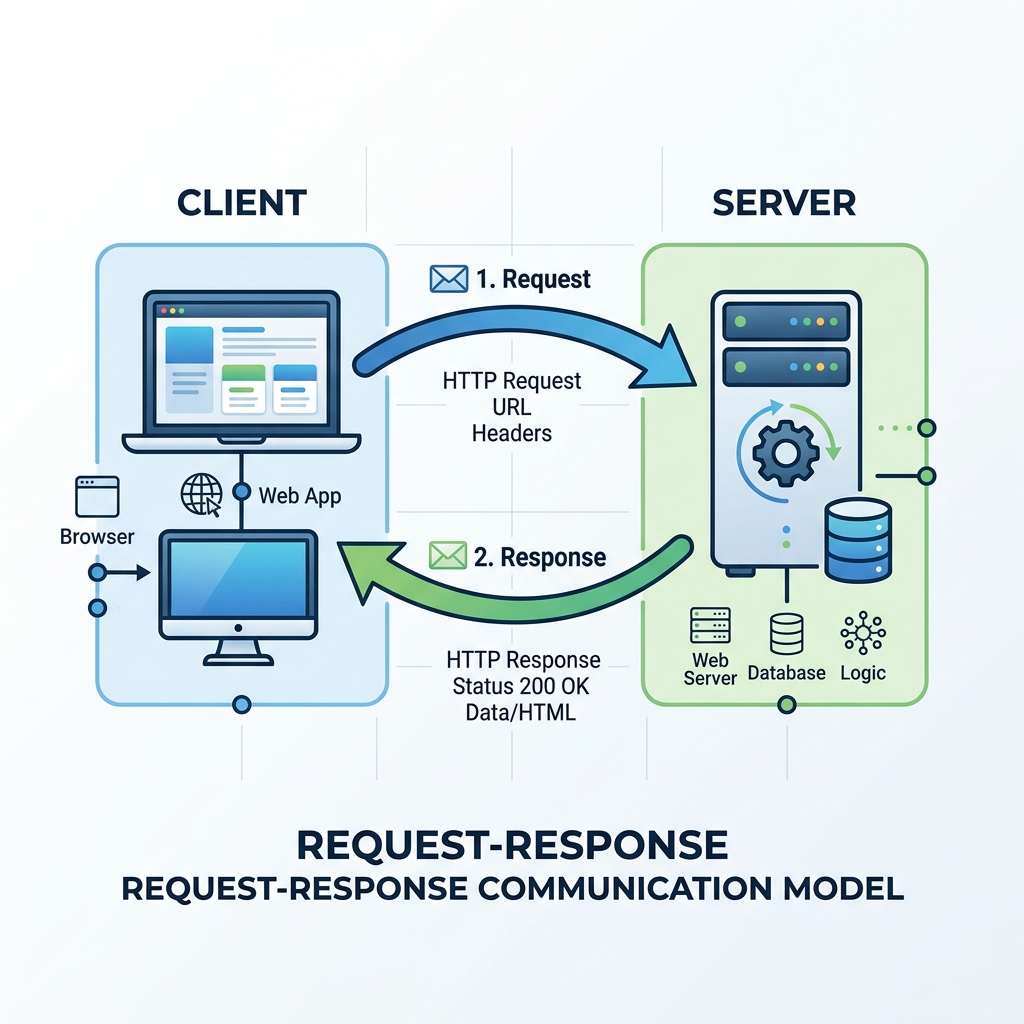
💡 Example (PDF/Web Concept)
Jab hum browser me kisi website ko open karte hain: Browser (client) request bhejta hai, aur Server website ka data bhejta hai.
📢 (2) Publish-Subscribe Model
Ye model MQTT jaise protocols me use hota hai, jisme 3 components hote hain: Publisher, Broker, Subscriber.
⚙️ Working
- • Publisher data ko publish karta hai
- • Data broker ke paas jata hai
- • Broker us data ko subscribers tak bhejta hai
- • Subscriber directly publisher se connect nahi hota
📌 Important Points
- • Data topics ke basis par share hota hai
- • Loose coupling (direct connection nahi)
- • IoT systems ke liye bahut efficient hai
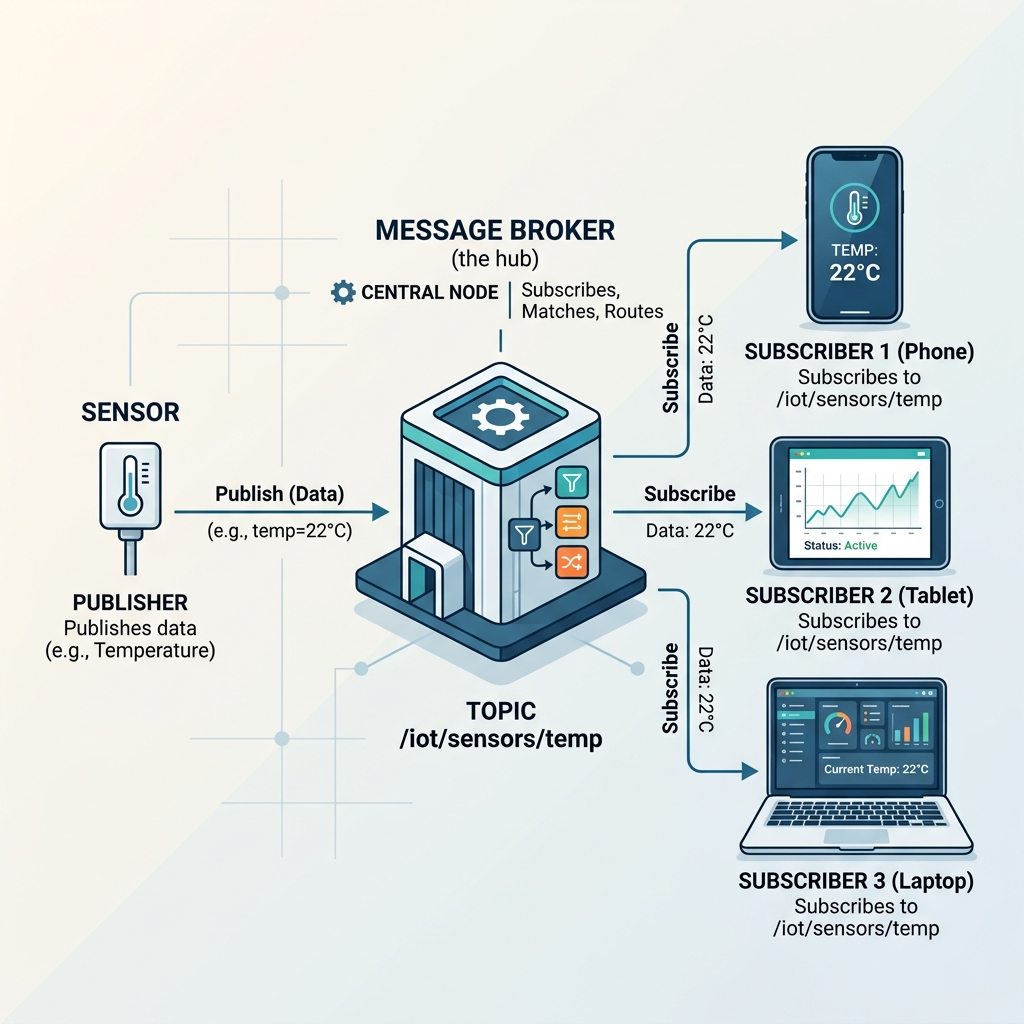
💡 Example
Temperature sensor data ko publish karta hai, aur User ki Mobile app us data ko receive karne ke liye subscribe karti hai.
📥 (3) Push-Pull Model
Ye model data ko queue ke through transfer karta hai. Isme 2 roles hote hain: Producer (Push) aur Consumer (Pull).
⚙️ Working
- • Producer data ko queue me push karta hai
- • Consumer queue se data pull karta hai
- • Queue ek buffer ki tarah kaam karta hai
📌 Important Points
- • Data temporarily store hota hai
- • Multiple consumers ek hi queue use kar sakte hain
- • Load balancing bahut easy hota hai
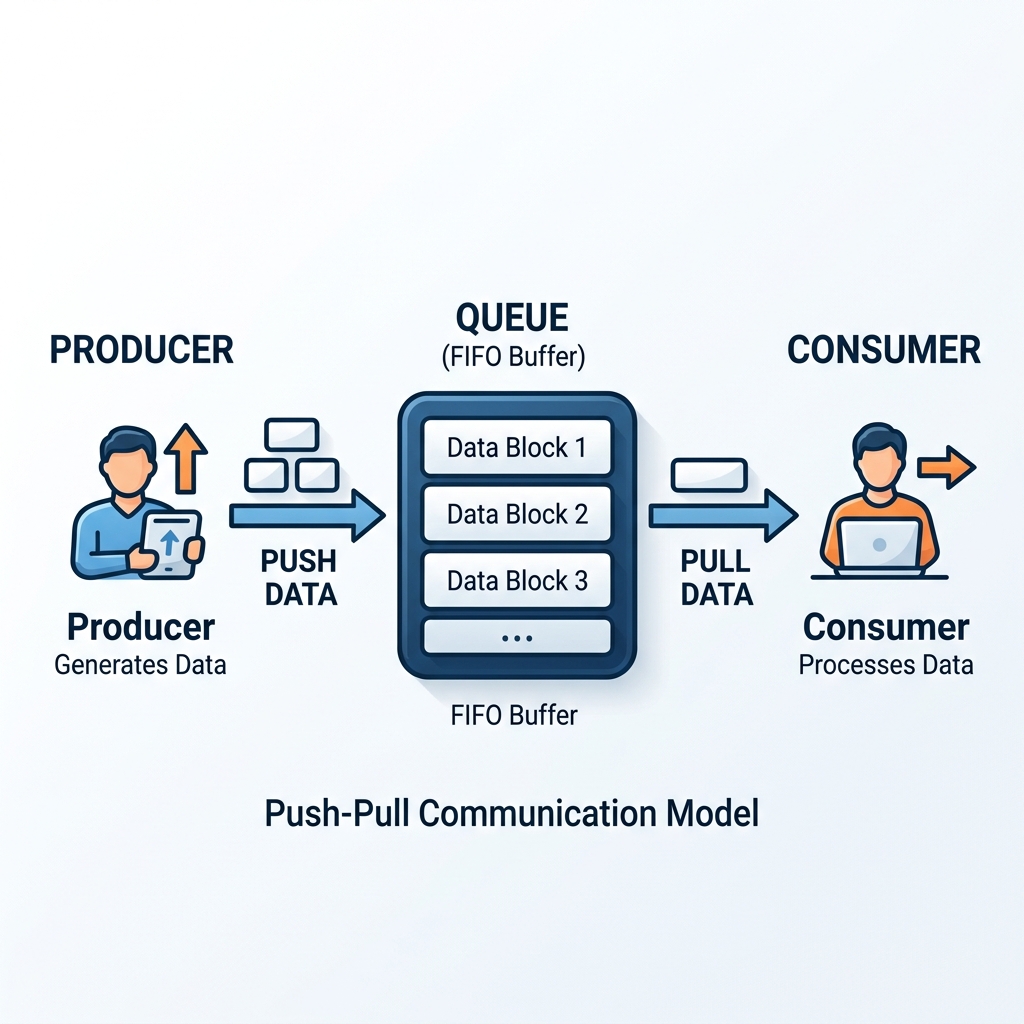
💡 Example
Sensor data lagatar queue me store hota rehta hai, aur multiple systems apne hisab se us data ko read (pull) karte rehte hain.
🤝 (4) Exclusive Pair Model
Ye ek one-to-one communication model hai jisme sirf do devices direct connect hote hain aur ek dusre ko message bhej sakte hain.
⚙️ Working
- • Continuous connection maintain hota hai
- • Full duplex communication (dono side se ek saath) hota hai
📌 Important Points
- • Direct communication hota hai
- • Koi third party ya broker nahi hota
- • Secure connection hota hai
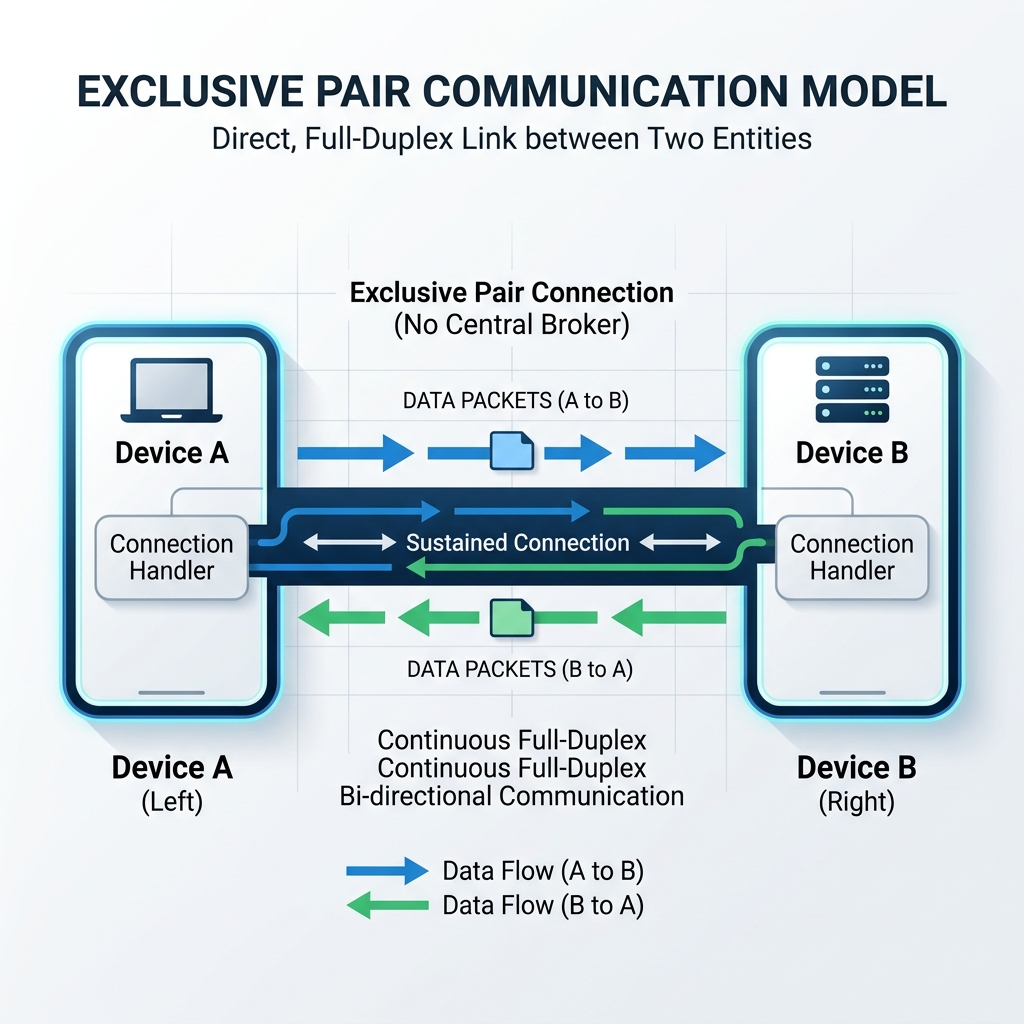
💡 Example
Client ↔ Server ke beech direct websocket communication ya phir Bluetooth pairing (jaise Mobile aur Wireless Earphones ka connection).
🔴 Development Tools Used in IoT
Ye tools developers ko help karte hain:
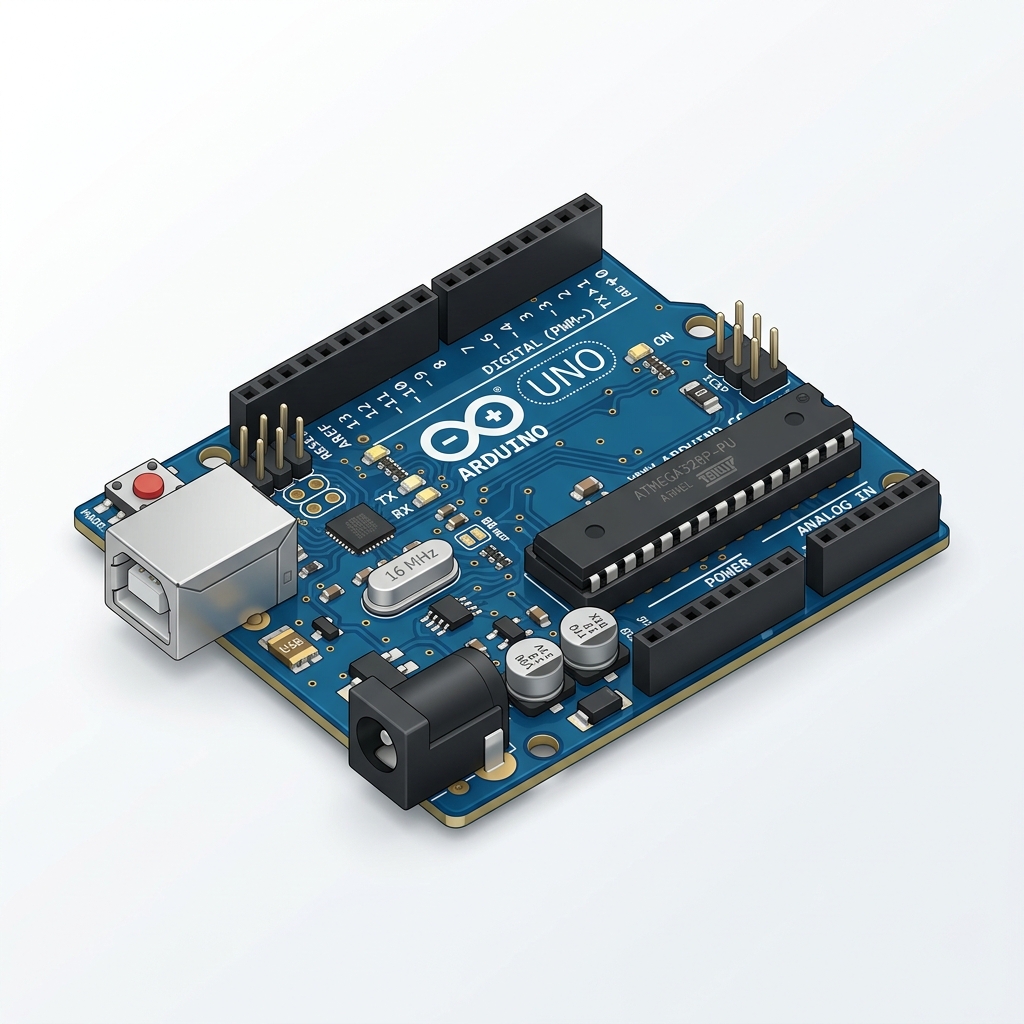
🔹 (1) Arduino
Arduino ek open-source platform hai jo hardware aur software dono provide karta hai.
👉 Ye ek small electronic board hota hai jisme:
- • Microcontroller (CPU) hota hai
- • Input/Output pins hoti hain
🔸 Important Points
- • Real-time system ki tarah kaam karta hai
- • Input (sensor data) ko read karta hai
- • Output (LED, motor etc.) ko control karta hai
🔸 Use kaha hota hai
Smart home systems, Automation projects, IoT prototypes
💡 Example Workflow
Temperature sensor → Arduino → Fan ON/OFF
🔹 (2) Raspberry Pi
Raspberry Pi ek credit-card size ka mini computer hota hai jo Linux operating system par kaam karta hai.
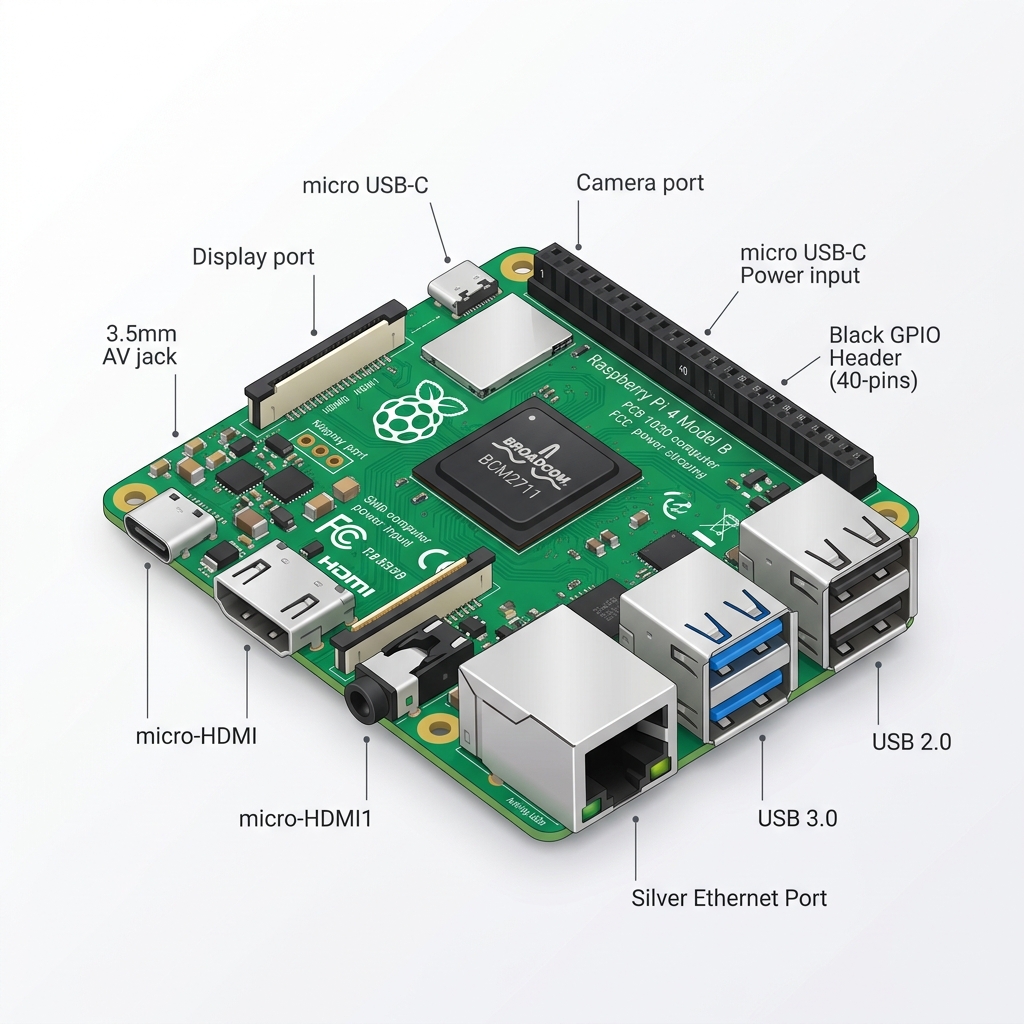
👉 Ye Arduino se powerful hota hai kyunki:
- • Isme OS run hota hai
- • Storage aur networking support hota hai
🔸 Important Points
- • Memory card (SD card) use hota hai
- • WiFi aur HDMI support hota hai
- • TV ya monitor se connect ho sakta hai
🔸 Use kaha hota hai
Smart surveillance system, Cloud-based IoT system, AI + IoT projects
💡 Example
CCTV camera → Raspberry Pi → Live monitoring
🔹 (3) Tessel 2
Tessel 2 ek development board hai jo specially IoT applications ke liye design kiya gaya hai.
👉 Features:
- • Built-in WiFi hota hai
- • JavaScript (Node.js) par kaam karta hai
- • Fast development aur easy programming
🔸 Tessel 2 ka kaam
IoT devices ko internet se connect karna, Sensors se data lena, Cloud me data bhejna.
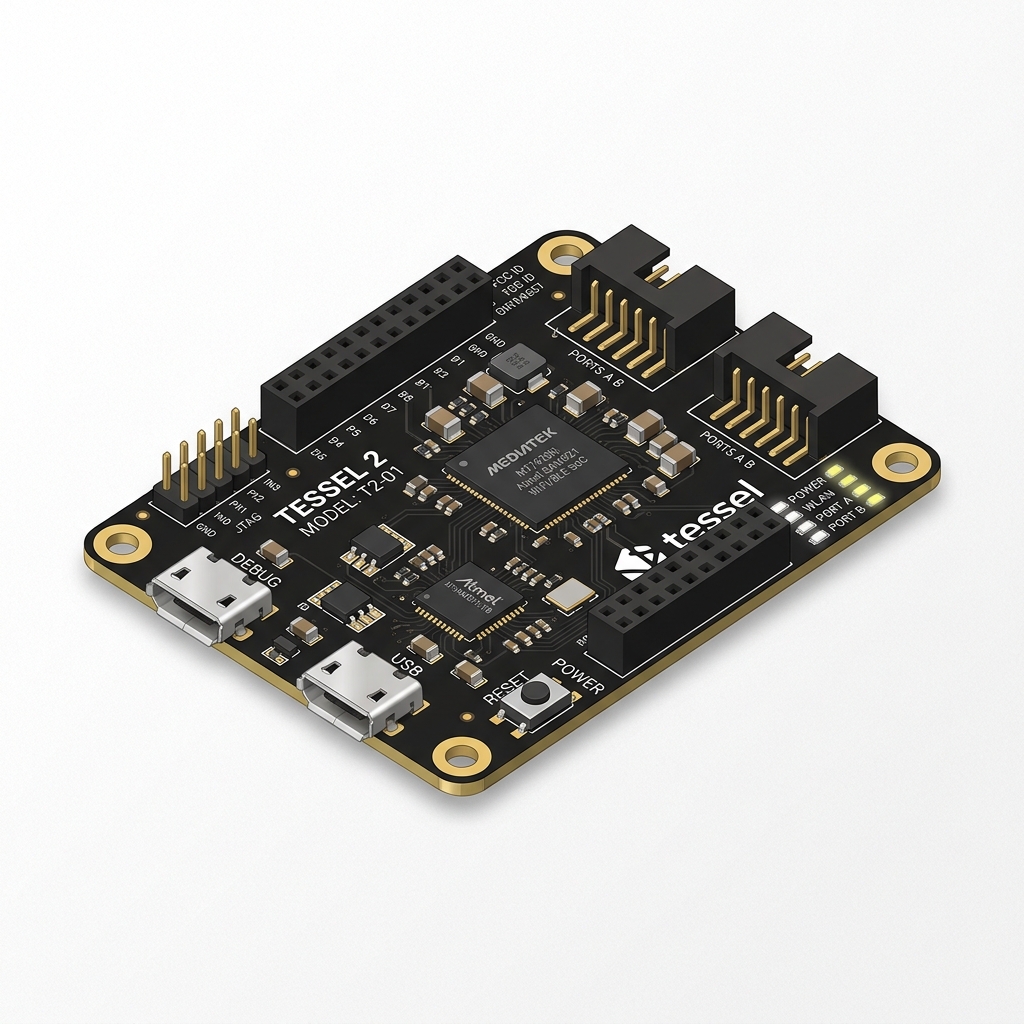
💡 Example Workflow
Sensor data → Tessel → Cloud
🔹 (4) Kinoma Create
Kinoma Create ek aisa tool hai jo IoT devices ke beech communication setup karne ke liye use hota hai.
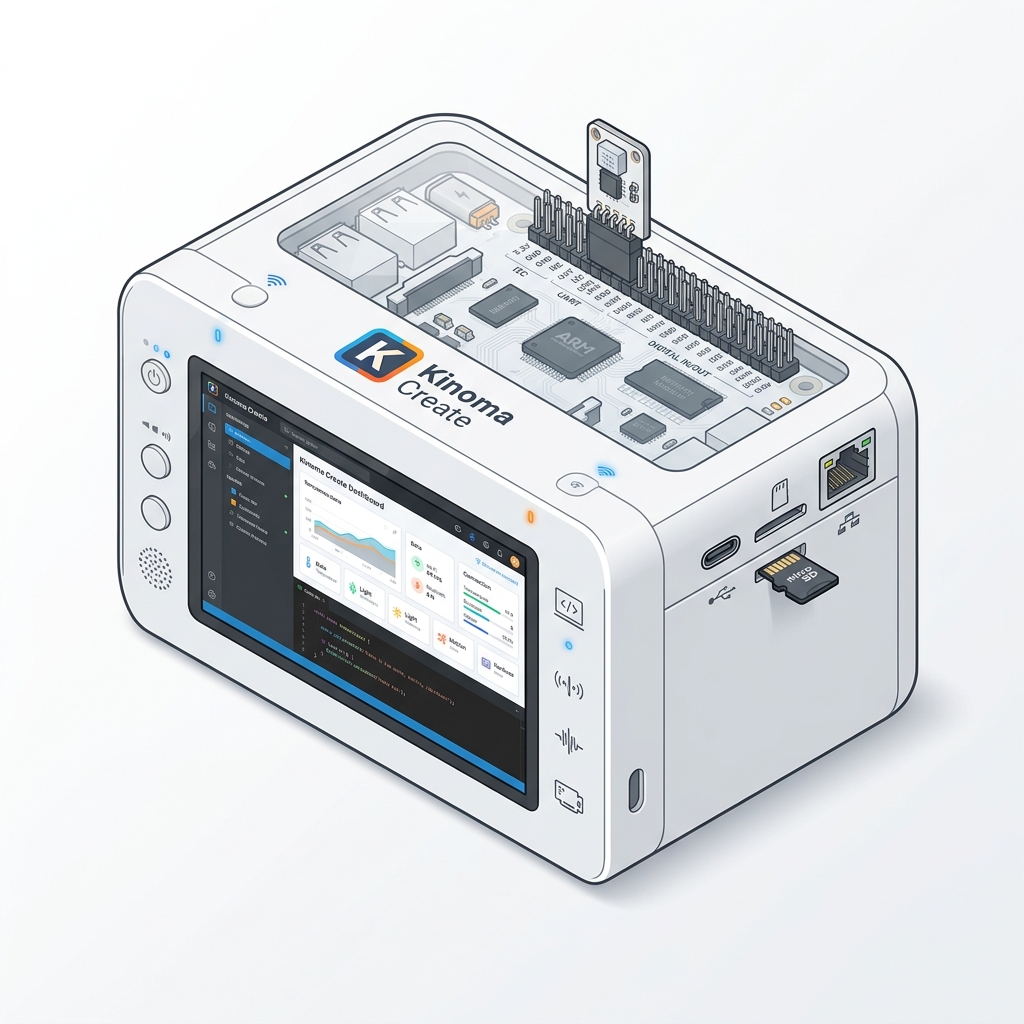
👉 Ye developers ko help karta hai:
- • Devices ke beech communication establish karne me
- • IoT apps develop karne me
🔸 Important Points
- • JavaScript based hai
- • Fast prototyping aur easy interface
💡 Example
Smart home system ka control panel banana
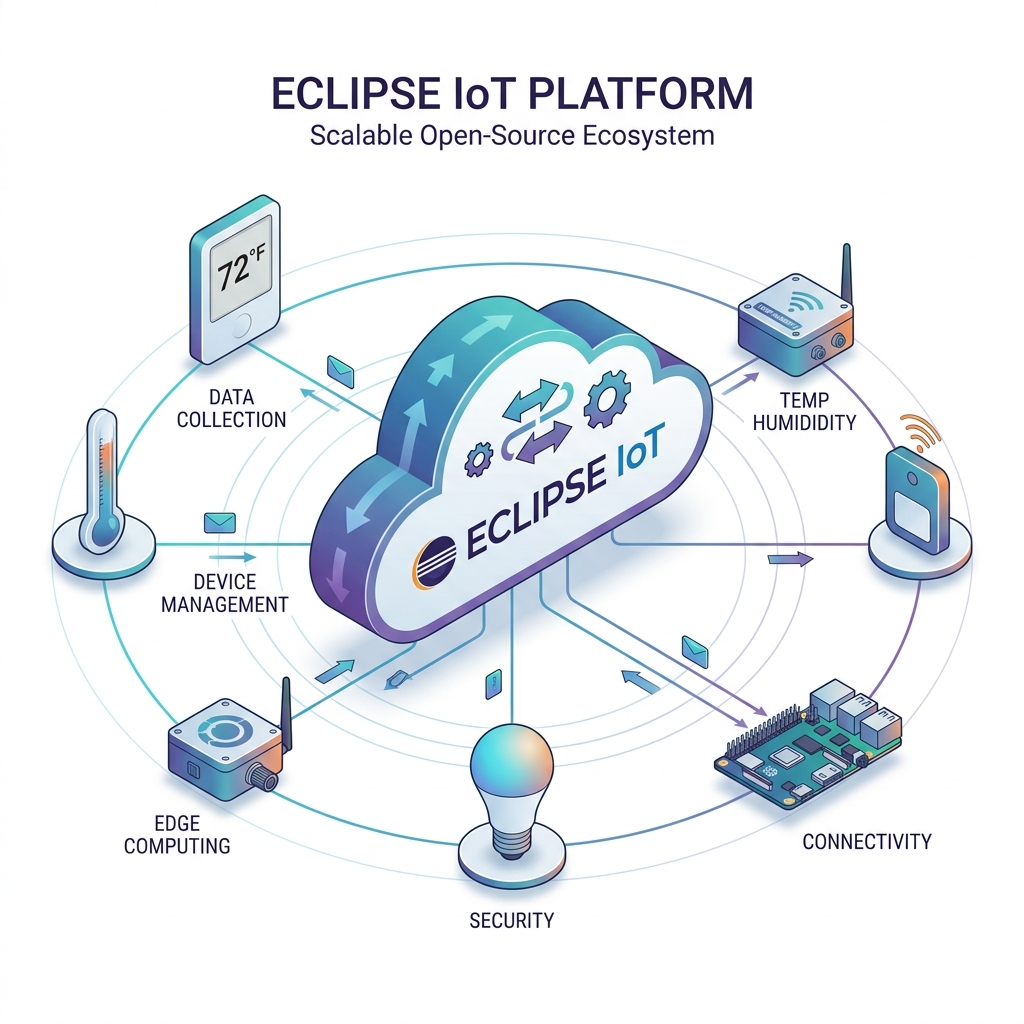
🔹 (5) Eclipse IoT
Eclipse IoT ek open-source platform hai jo IoT development ke liye use hota hai.
👉 Features:
- • Ye Java-based tools provide karta hai
- • Open-source aur Scalable hai
- • Enterprise level use ke liye best hai
🔸 Eclipse IoT ka kaam
- • IoT devices, cloud aur gateway ko connect karna
- • Large-scale IoT applications develop karna
💡 Example
Smart city system develop karna
📝 Important MCQs (50 Questions)
IoT ka full form kya hai?
IoT term kisne diya tha?
Kevin Ashton ne IoT term kab diya tha?
IoT me devices kis ke through connect hote hain?
IoT ka main purpose kya hai?
IoT me “things” ka matlab kya hota hai?
IoT ka sabse important feature kaunsa hai?
IoT devices data kaise bhejte hain?
IoT me intelligence kiski help se aati hai?
Sensors ka use kisliye hota hai?
GPS kis type ka sensor hai?
IoT ka nature kaisa hota hai?
IoT me security kyon important hai?
Firewall ka use kisliye hota hai?
VPN ka use kisliye hota hai?
IoT system ka pehla component kya hota hai?
Sensors kya collect karte hain?
Data processing ka kaam kya hai?
User interface ka use kisliye hota hai?
Smart watch kis category me aati hai?
Smart beds ka use kaha hota hai?
Traffic monitoring me IoT ka use kisliye hota hai?
Agriculture me sensors kya check karte hain?
Smart home me kaunsi device use hoti hai?
Smart city me IoT ka use kisliye hota hai?
CCTV ka full form kya hai?
Building blocks of IoT me kya include hota hai?
Processor ka kaam kya hai?
Gateway ka use kisliye hota hai?
PAN ka full form kya hai?
LAN ka full form kya hai?
MAN ka full form kya hai?
WAN ka full form kya hai?
Bluetooth kis type ki technology hai?
Bluetooth kis frequency par kaam karta hai?
BLE ka full form kya hai?
WiFi ka standard kya hai?
LiFi kis par based hota hai?
Zigbee ka standard kya hai?
RFID ka full form kya hai?
RFID me kitne main components hote hain?
Passive RFID tag me battery hoti hai?
NFC ka full form kya hai?
GSM kis generation ki technology hai?
LTE kis generation se related hai?
HTTP kis model par kaam karta hai?
MQTT kis model par based hai?
MQTT me mediator ka kaam kaun karta hai?
IPv4 me kitne bit address hota hai?
IPv6 me kitne bit address hota hai?